Mitigate fast, document everything, bill clean.
Water, fire, and mold work is urgent and documentation-heavy. Revcore keeps your dispatch, photos, and billing connected so jobs move fast and claims stay airtight.
14-day free trial, no credit card required.

What restoration contractors need from software
Restoration contractors need software that answers emergency calls at any hour, dispatches a crew fast, documents every room for the claim, and bills mitigation and rebuild as separate phases. Revcore Pro handles the dispatch, photos, job file, and phased invoicing in one place. It does not write Xactimate estimates or connect to moisture meters, so crews log readings as notes, photos, or custom fields on the job.
Where restoration jobs get stuck.
The same few things cost restoration crews time and money on every job. This is what Revcore takes off your plate.
- 01
Emergency calls at all hours
Capture leads instantly and assign the call to an open crew.
- 02
Documentation for every claim
Keep moisture readings, photos, and scope on the job for adjusters.
- 03
Billing across mitigation and rebuild
Invoice each phase clearly so payment is not held up.
How a restoration job runs in Revcore.
From the first call to the final payment, every step happens on the same job record, so nobody retypes anything and nothing waits on the office.




Restoration job, example
Answer the 2 a.m. water loss
1/7




Web form leads land on the pipeline with the loss type and address, and two-way texting lets you reply in seconds. Tag the source so you know which plumbers, agents, and property managers are sending you the jobs that sign.
CRM and pipelineDrag the call onto an open team on the crew board, and it lands on their phone with directions to the stop. The homeowner gets an automatic appointment confirmation by text while they are still pulling up wet carpet.
Field and dispatchShoot affected rooms, cabinets, and flooring, and mark up photos to show the water line and the cut. Log moisture readings as notes, photos of the meter, or custom fields, and keep equipment placement on the job file.
Job tracking and photosSchedule daily monitoring visits on the crew board and clock techs in with GPS so time on site ties to the job. Each day's readings and photos stack on the same file the adjuster will review.
SchedulingUse pipeline stages for mitigation, estimate pending, approved, and rebuild. Build the reconstruction estimate from your saved line items and assemblies, and log approved supplements and hidden damage as change orders so they carry onto the rebuild invoice without retyping.
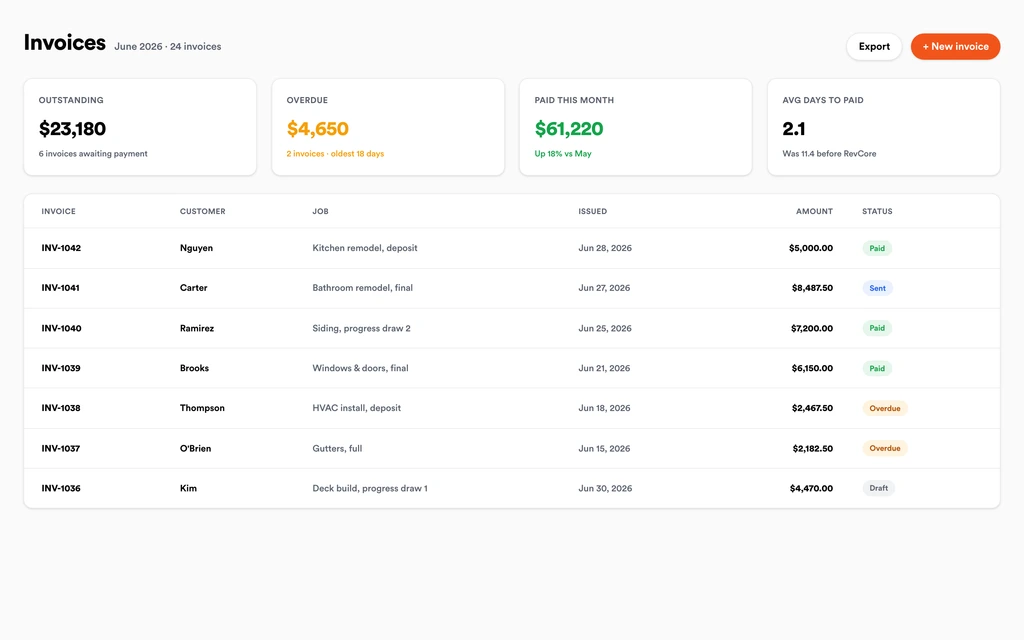
EstimatesInvoice mitigation and rebuild separately, collect the deductible from the homeowner by text-to-pay, and track the carrier check against the right phase so nothing sits unapplied. Payouts land in 1 to 2 business days, or instantly for eligible accounts.
InvoicingSet up for the way restoration jobs run.
Fast dispatch
Put an open crew on the call and start the clock on mitigation.
Photo and reading documentation
Every photo and reading tied to the job for the claim file.
Project pipeline
Track mitigation through rebuild with stages that fit the work.
Phase billing
Invoice mitigation and rebuild separately with fast payouts.
What to look for in restoration software.
Take this list to any demo or trial, ours included. If a tool cannot show you each of these on a real job, keep looking.
Fast lead capture after hours
Water losses do not wait for business hours. A fast reply by text keeps the homeowner from calling the next company on the list.
Fast dispatch
An open crew should get the call quickly. Look for a drag-and-drop crew board and automatic appointment confirmations to the property owner.
Photo documentation built into the job
Adjusters want dated, marked up photos of every affected area. They should live on the job file, not in a separate photo app.
A place for readings and drying logs
Know how the platform stores moisture readings. Revcore has no meter integration, so crews log readings as notes, photos, or custom fields.
Separate mitigation and rebuild billing
Mitigation and reconstruction are often paid on different timelines. Your invoicing should handle each phase and the deductible without spreadsheets.
Change orders for supplements
Hidden damage behind drywall changes the scope. Approved supplements should flow onto the invoice so nothing is left off the final bill.
Referral source tracking
Plumbers, agents, and property managers feed restoration work. Attribution should show which referral partners turn into signed jobs, so you know whose lunch to buy.
An honest answer on estimating
Know whether the software writes carrier estimates. Revcore does not write Xactimate estimates, so the carrier scope stays in Xactimate and the job runs in Revcore.
The whole platform comes standard.
Quoting is the start. Every restoration account runs the full job, from the first lead to the final payment, in one login.
- CRM and pipelineEvery lead and job on one board
- Estimates and proposalsGood, Better, Best, signed on the spot
- Scheduling and dispatchCrews on one shared calendar
- CommunicationsTexts, calls, and email in one thread
- Invoicing and paymentsDeposits and finals, paid online
- Service agreementsRecurring work, tracked
- AutomationsFollow-ups that send themselves
- ReportingRevenue and close rate at a glance
Restoration software, by category
Looking for one piece? Each page shows how that part works for restoration crews.
Comparing restoration software?
Honest side-by-sides with the tools restoration crews weigh most. Every plan is one flat price with crew seats included. See pricing.
- Revcore vs CompanyCamStrong photo documentation. Revcore keeps photos on the job with dispatch and billing.
- Revcore vs ServiceTitanEnterprise field service platform. Revcore is lighter to set up with seats included.
- Revcore vs JobberGeneral field service tool. Revcore adds phased billing, change orders, and a homeowner portal.
- Revcore vs BuildertrendConstruction project management. Revcore covers the emergency call through the rebuild payment.
- All comparisons →
“One system from the first call to the final payment. We retired four separate subscriptions the month we switched.”

Composite operator based on early-access usage. Outcomes are illustrative; individual results vary.






Restoration questions, answered.
Still deciding if Revcore fits your crew? Talk to our team.
What is the best software for restoration companies?
Restoration shops usually need a job management system plus Xactimate for carrier estimates. Dedicated restoration platforms focus on drying logs and carrier workflows, while tools like ServiceTitan or Jobber cover dispatch and billing. Revcore Pro fits companies that want emergency dispatch, photo documentation, phased billing, and the rebuild sale in one login, and it runs alongside Xactimate rather than replacing it.
Does Revcore write Xactimate estimates?
No. Revcore does not write or import Xactimate estimates. Most restoration companies keep writing the carrier scope in Xactimate, then attach it to the job in Revcore as a document. Approved supplements can be logged as change orders so they carry onto the invoice.
Can I log moisture readings in Revcore?
Yes, manually. Revcore does not integrate with moisture meters, so techs record readings as notes, photos of the meter, or custom fields such as room, material, and reading. Each day's entries stay on the job file next to the photos for the adjuster.
How do I bill mitigation and rebuild separately?
Create separate invoices or milestones for each phase. Mitigation can go out as soon as drying is complete, and the rebuild bills on its own schedule, with deposits or progress billing by percentage complete. The homeowner's deductible can be collected by text-to-pay link.
Can the homeowner sign a work authorization on their phone?
Yes. Send the authorization and scope through the homeowner portal, and they can review and e-sign from their phone with no app or account to set up. The signed document stays on the job alongside the photos, notes, and claim details the adjuster will ask for.
How do I track which plumbers and agents send me jobs?
Tag each lead with its referral source when it comes in. Lead source attribution shows which plumbers, insurance agents, and property managers sent jobs that became signed work, so you know where to spend time building relationships and which partners have gone quiet lately.
Can I use Revcore for mold remediation and fire jobs too?
Yes. Pipeline stages, job files, and templates are adjustable, so mold remediation, fire and smoke cleanup, and contents work can each have their own stages and saved line items. Custom fields can capture containment details, air testing results, or anything your process requires.
Does it work on my phone in the field?
Yes. Revcore runs on the web, iOS, and Android, so restoration crews can open the job, add photos, take a signature, and collect payment from the site.
How fast can we switch over?
Most crews are live within a week. Paid plans include hands-on onboarding: we import your customers and pricing, set up your proposal templates, and add your team, then check in until it sticks.
What does Revcore Pro cost for restoration?
Plans start at $249/mo billed monthly ($207/mo on annual billing, 2 months free) with crew seats included, plus CRM, estimating, scheduling, and invoicing. Every plan includes a 14-day free trial with no credit card required.







