From service call to paid, without the paperwork.
Service work moves fast. Revcore lets your electricians quote on site, capture the job, and collect payment before they pull out of the driveway.
14-day free trial, no credit card required.

What electrical contractors need from software
Electrical contractors juggle quick service calls and permitted projects like panel upgrades, service changes, EV charger circuits, and remodel rough-ins that need inspections before the final bill. Revcore Pro lets electricians quote from the truck with saved assemblies, document every panel and rough-in with photos, schedule around inspections, and collect deposits and finals in one login. Permits and inspections are tracked on the job, but Revcore does not file permits for you.
Where electrical jobs get stuck.
The same few things cost electrical crews time and money on every job. This is what Revcore takes off your plate.
- 01
Quoting from the van
Flat-rate or custom pricing on the phone, approved by the customer in a tap.
- 02
Lost job photos
Panel shots and code documentation tagged to the job automatically.
- 03
Slow collections
Card and ACH on the spot, so you stop chasing checks for service calls.
How a electrical job runs in Revcore.
From the first call to the final payment, every step happens on the same job record, so nobody retypes anything and nothing waits on the office.




Electrical job, example
Log the call and qualify it
1/7




Leads arrive from web forms, and two-way texting lets you reply in seconds. A short qualification survey asks about panel size, breaker trips, or the EV charger model, so the right electrician shows up prepared.
SurveysShoot the panel, the meter base, the service drop, and anything scorched or double tapped, then mark up the photos. Notes on amperage and existing conditions go on the job for whoever pulls the permit.
Job tracking and photosBuild the estimate from saved assemblies like a 200 amp panel upgrade, a service change, or a dedicated circuit, with labor and material rates set to your area. Offer tiers when there is a choice, like a charger circuit alone or with a panel upgrade.
EstimatesThe customer e-signs and pays the deposit in one step, and the approved estimate becomes a job. Record the permit number and inspection dates on the job file so the office and the crew see the same status.
Homeowner portalPut the rough-in, the utility disconnect, and the trim-out on the crew board as separate visits, synced to Google Calendar. Move them when the inspector or utility changes the date, and text the homeowner automatically.
SchedulingPhotograph the rough-in before drywall, the labeled panel, and the inspection sticker. Everything lands on the job file, ready for the homeowner, the general contractor, or the electrician who opens that panel on a future service call.
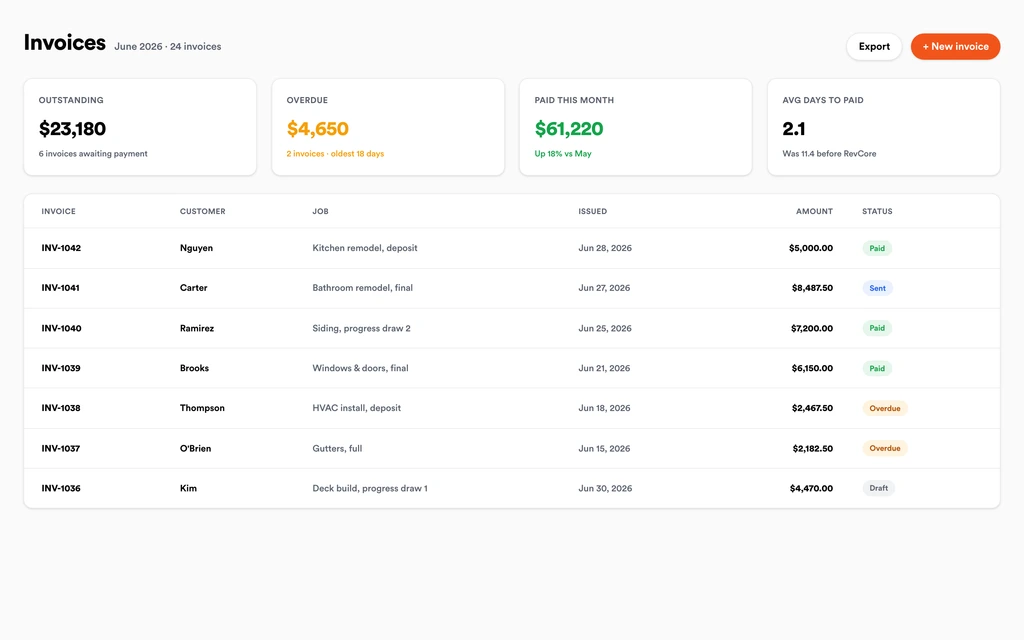
Job tracking and photosInvoice from the job with any change orders on it, using milestone billing for rough-in and final on larger jobs. Collect by card or ACH with a text-to-pay link, and hand your bookkeeper a full data export.
InvoicingSet up for the way electrical jobs run.
Saved pricing and assemblies
Templates and saved line items your whole team can quote from in the field.
On-site estimates
Build and send an estimate from the truck and convert it to a job instantly.
Photo documentation
Timestamped photos of panels and installs stored on the job file.
Field payments
Collect by card or ACH with a text-to-pay link before you leave.
What to look for in electrical software.
Take this list to any demo or trial, ours included. If a tool cannot show you each of these on a real job, keep looking.
Saved assemblies for repeat work
Panel upgrades, service changes, and circuits repeat all week. Saved assemblies let any electrician quote them consistently from the truck.
Panel and rough-in photo records
Inspectors, general contractors, and future techs want to see what is behind the wall. Photos with markup should attach to the job automatically.
Permit and inspection tracking
Look for a job file that holds permit numbers, inspection dates, and sign-off photos, so nobody has to ask the office where things stand.
Multi-visit scheduling
Rough-in, inspection, and trim are separate trips. The schedule should handle each visit and let you move them when the inspector reschedules.
Milestone billing for projects
Bigger electrical jobs bill at deposit, rough-in, and final. Your invoicing should handle milestones without a spreadsheet on the side.
Qualification before the truck rolls
Knowing the panel brand, amperage, and charger model before the visit saves a second trip. Intake surveys and custom fields capture it.
Field payments on service calls
Small service tickets add up. Electricians should collect on site with a text-to-pay link or the card on file before leaving.
The whole platform comes standard.
Quoting is the start. Every electrical account runs the full job, from the first lead to the final payment, in one login.
- CRM and pipelineEvery lead and job on one board
- Estimates and proposalsGood, Better, Best, signed on the spot
- Scheduling and dispatchCrews on one shared calendar
- CommunicationsTexts, calls, and email in one thread
- Invoicing and paymentsDeposits and finals, paid online
- Service agreementsRecurring work, tracked
- AutomationsFollow-ups that send themselves
- ReportingRevenue and close rate at a glance
Electrical software, by category
Looking for one piece? Each page shows how that part works for electrical crews.
Comparing electrical software?
Honest side-by-sides with the tools electrical crews weigh most. Every plan is one flat price with crew seats included. See pricing.
- Revcore vs ServiceTitanEnterprise service platform. Revcore is quicker to set up, with seats included.
- Revcore vs Housecall ProPopular for residential service. Revcore adds milestone billing and inspection tracking on the job.
- Revcore vs JobberClean quoting and invoicing. Revcore adds dispatch maps and multi-visit project scheduling.
- Revcore vs FieldEdgeService and agreement focused. Revcore adds tiered estimates with a margin check.
- Revcore vs Service FusionField service with flat pricing. Revcore adds the homeowner portal and change orders.
- All comparisons →
“Service calls used to take days to bill. Now the tech collects on site and the payment is in before the truck leaves the driveway.”

Composite operator based on early-access usage. Outcomes are illustrative; individual results vary.






Electrical questions, answered.
Still deciding if Revcore fits your crew? Talk to our team.
What is the best software for electrical contractors?
It depends on whether you are mostly service or mostly project work. ServiceTitan and FieldEdge are common with larger service shops, and Housecall Pro and Jobber with smaller teams. Revcore Pro fits residential electrical contractors who want on-site quoting from saved assemblies, panel and inspection photos, multi-visit scheduling, and field payments in one login.
Can electricians quote panel upgrades from the truck?
Yes. Save a panel upgrade or service change as an assembly with its labor and materials, then build the estimate on a phone in the driveway. The customer e-signs and pays the deposit from the same link, and the approved estimate becomes a job.
Does Revcore pull electrical permits?
No. Revcore does not file permits with the city or county. You pull the permit as usual and record the permit number, inspection dates, and sign-off photos on the job file so the office, the crew, and the homeowner can all see where the job stands.
How do I schedule rough-in, inspection, and trim-out?
Create separate visits on the same job and place each on the crew board or calendar. When the inspector or utility moves a date, drag the visit and the homeowner gets a text. Crews clock in with GPS, so hours tie back to the job.
Can I use Revcore for EV charger installs?
Yes. Use a qualification survey to collect the charger model, parking spot, and panel details, quote the circuit from a saved assembly, and offer a panel upgrade or load management as a higher tier when the existing service is too small. Rough-in, inspection, and final go on the schedule as visits.
Does Revcore work for commercial electrical work?
It is built for residential and light commercial service and project work. Progress billing by percentage complete and milestone billing handle multi-phase jobs, and custom fields hold job-specific details. Revcore does not produce AIA style pay applications or takeoffs from plans.
Does Revcore sync with QuickBooks?
On the Scale plan, Revcore connects to QuickBooks Online and imports your customers and the last 12 months of invoices, so you start with your history. It does not send invoices or payments back to QuickBooks yet. Every plan can download a full export of its data for your bookkeeper. Most electrical shops run billing in Revcore and let the bookkeeper reconcile in QuickBooks.
Does it work on my phone in the field?
Yes. Revcore runs on the web, iOS, and Android, so electrical crews can open the job, add photos, take a signature, and collect payment from the site.
How fast can we switch over?
Most crews are live within a week. Paid plans include hands-on onboarding: we import your customers and pricing, set up your proposal templates, and add your team, then check in until it sticks.
What does Revcore Pro cost for electrical?
Plans start at $249/mo billed monthly ($207/mo on annual billing, 2 months free) with crew seats included, plus CRM, estimating, scheduling, and invoicing. Every plan includes a 14-day free trial with no credit card required.







