Inspect, quote, and close before the next storm.
Roofing moves fast after a hailstorm, and the crew that quotes first usually wins. Revcore lets you document the damage, build a tiered proposal, and collect the deposit from the driveway.
14-day free trial, no credit card required.
What roofing contractors need from software
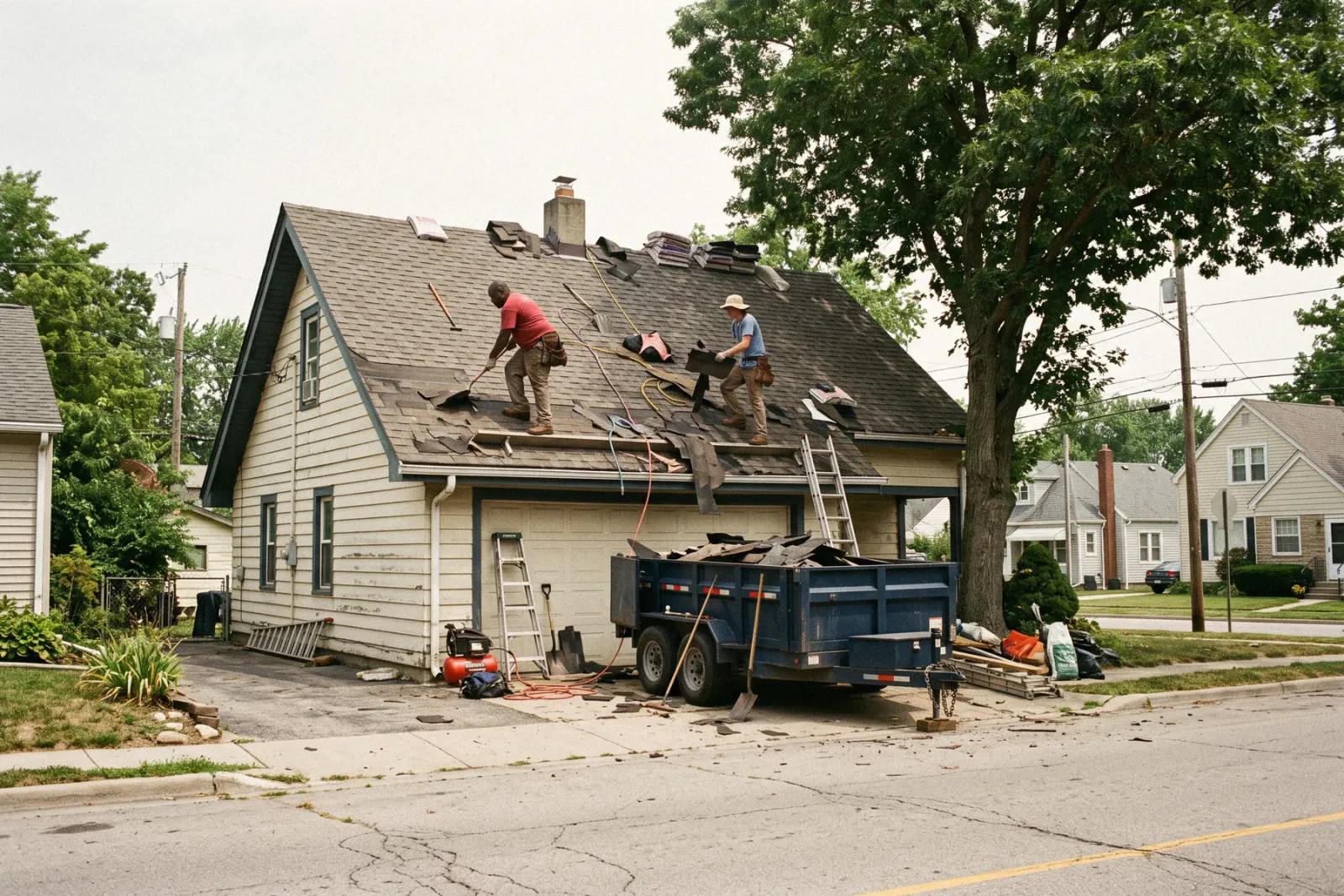
Roofing contractors need software that handles both retail reroofs and insurance claims: inspection photos, a tiered proposal, a deposit at signing, crew scheduling for tear-offs, and milestone billing through the final check. Revcore Pro runs that whole job in one login, from the storm lead to the final payment, with a built-in in-home presentation and the deposit collected at signing. It does not generate aerial roof measurements, so most roofers pair it with EagleView or Roofr for reports.
Where roofing jobs get stuck.
The same few things cost roofing crews time and money on every job. This is what Revcore takes off your plate.
- 01
Roof inspections that turn into paperwork
Capture photos, markup, and your own measurements on the roof and drop them straight onto the job file, no clipboard required.
- 02
Insurance jobs that stall on documentation
Keep every photo, supplement, and approval in one place so adjusters and homeowners stay aligned.
- 03
Deposits and draws that lag the work
Collect deposits up front and progress payments on completion with fast payouts (1 to 2 business days, or instant for eligible accounts).
How a roofing job runs in Revcore.
From the first call to the final payment, every step happens on the same job record, so nobody retypes anything and nothing waits on the office.




Roofing job, example
Capture the lead while the storm is fresh
1/7




Web forms and qualification surveys land on the pipeline as leads, and two-way texting lets you reply in seconds. Tag the lead source so you know which neighborhoods and campaigns turn into signed roofs.
CRM and pipelineWalk the roof and shoot the slopes, flashing, vents, and collateral damage from your phone. Mark up photos to circle hail hits and lifted tabs, add notes and your measurements, and everything lands on the job file the adjuster and homeowner will see.
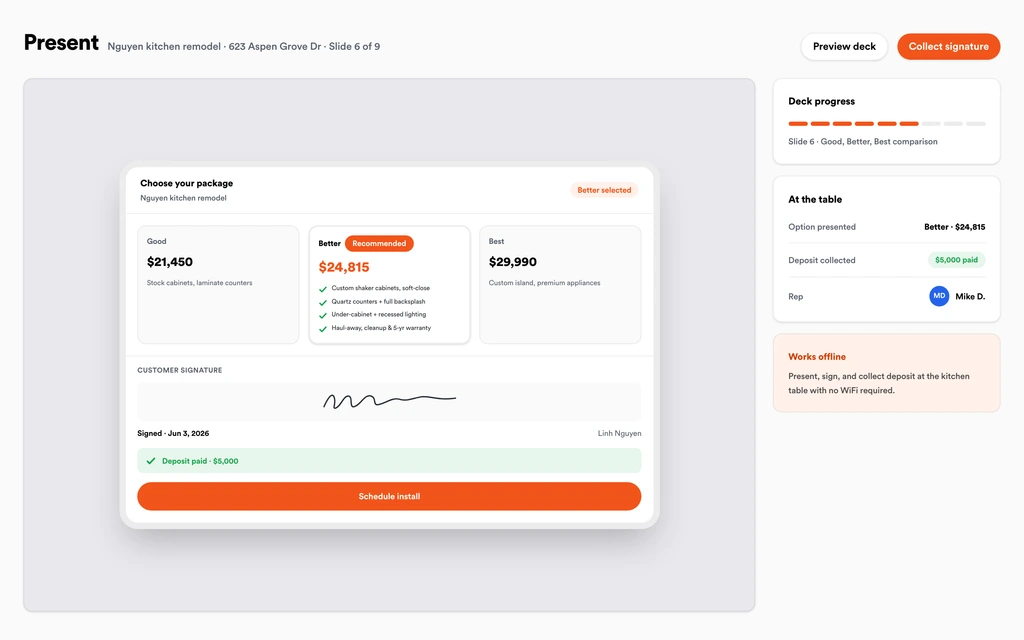
Job tracking and photosBuild Good, Better, Best from your roofing template, with shingle lines, underlayment, and ventilation priced to your zip code. Walk the homeowner through the in-home presentation, then take the signature and the deposit in the same step.
Sales presentationsKeep the claim number, adjuster notes, scope, and every supplement photo on one job. When the adjuster approves added line items, log them as a change order so the extra scope lands on the invoice instead of in a notebook.
Homeowner portalDrop the job on the crew board once materials are set, move it when the weather turns, and let the homeowner know by text. Crews clock in from the site with GPS, so you know who was on the roof and for how long.
SchedulingShoot the finished roof, the cleanup, and the magnet sweep, and share them in the homeowner portal. Store the warranty and permit sign-off on the job so the paperwork is there when the homeowner calls in five years.
Job tracking and photosInvoice from the job with change orders already on it, send a text-to-pay link, and bill the recoverable depreciation as its own milestone. Payouts land in 1 to 2 business days, or instantly for eligible accounts.
PaymentsSet up for the way roofing jobs run.
Photo job reports
Before, during, and after shots assembled automatically and tagged to the right roof.
Tiered system proposals
Good, Better, Best shingle and material options homeowners approve from their phone.
Crew scheduling
Lay out tear-offs and installs by crew and confirm who is on site with GPS clock-in.
Milestone payments
Deposits, supplements, and finals collected without the bank runs.
What to look for in roofing software.
Take this list to any demo or trial, ours included. If a tool cannot show you each of these on a real job, keep looking.
Insurance and retail in the same pipeline
Claim jobs and cash jobs move through different stages. You should be able to see both on one board without a second tool.
Photo documentation with markup
Adjusters want dated photos of every slope. Look for markup, notes, and photos stored on the job, not in a separate app.
Tiered proposals with e-signature
Good, Better, Best shingle options lift the average ticket. The homeowner should be able to sign and pay the deposit in one step.
Change orders for supplements
Approved supplements and added decking need to flow onto the invoice automatically, or they get missed at the final.
Milestone and depreciation billing
Deposit, completion, and recoverable depreciation are separate payments. Your invoicing should handle each without spreadsheets.
Crew scheduling that survives weather
Tear-offs move constantly. Rescheduling should take a drag, and the homeowner should hear about it without a phone call.
An honest answer on measurements
Know whether the platform measures roofs or relies on a report provider. Revcore does not measure roofs, so plan on EagleView, Roofr, or your own tape.
Pricing that does not punish growth
Per-user pricing gets expensive when you add canvassers and crew leads. Look for plans with seats included.
The whole platform comes standard.
Quoting is the start. Every roofing account runs the full job, from the first lead to the final payment, in one login.
- CRM and pipelineEvery lead and job on one board
- Estimates and proposalsGood, Better, Best, signed on the spot
- Scheduling and dispatchCrews on one shared calendar
- CommunicationsTexts, calls, and email in one thread
- Invoicing and paymentsDeposits and finals, paid online
- Service agreementsRecurring work, tracked
- AutomationsFollow-ups that send themselves
- ReportingRevenue and close rate at a glance
Roofing software, by category
Looking for one piece? Each page shows how that part works for roofing crews.
Comparing roofing software?
Honest side-by-sides with the tools roofing crews weigh most. Every plan is one flat price with crew seats included. See pricing.
- Revcore vs JobNimbusRoofing CRM with boards and workflows. Revcore adds the in-home presentation and the deposit collected at signing.
- Revcore vs AccuLynxRoofing production and ordering. Revcore is all-trades with the kitchen-table close built in.
- Revcore vs RoofrMeasurements and quick proposals. Many roofers use Roofr reports alongside Revcore.
- Revcore vs LeapIn-home sales layer. Revcore puts the close, the job, and the payment in one login.
- Revcore vs CompanyCamPhoto documentation only. Revcore keeps photos inside the full job file.
- All comparisons →
“We quote right on the property and the homeowner has real options before we pack up. Deposits clear before we leave the driveway.”

Composite operator based on early-access usage. Outcomes are illustrative; individual results vary.




Roofing questions, answered.
Still deciding if Revcore fits your crew? Talk to our team.
What is the best software for roofing contractors?
The right fit depends on how you sell. Roofers who sell in the home and run insurance work need inspection photos, tiered proposals, supplements, crew scheduling, and milestone payments in one place. Revcore Pro covers that whole job in one login at a flat price with seats included. Roofing-only CRMs like JobNimbus and AccuLynx are also common choices, and Roofr is often used for measurements and quick proposals.
Does Revcore Pro do aerial roof measurements?
No. Revcore does not generate aerial or satellite roof measurements. Most roofers order a report from EagleView or Roofr, or measure on the roof, then enter the quantities into their Revcore roofing template to build the proposal.
Can Revcore handle insurance roofing jobs and supplements?
Yes. Keep the claim details, adjuster notes, and supplement photos on the job file, and log approved supplements as change orders so they carry onto the final invoice. Revcore does not write Xactimate estimates, so the adjuster's scope stays in their system.
How do I collect the deposit and the depreciation check?
Take the deposit at signing in the same step as the e-signature, then bill completion and recoverable depreciation as separate milestones. Homeowners can pay by card or ACH from a text link, and payouts land in 1 to 2 business days, or instantly for eligible accounts.
Can my canvassers and sales reps use it?
Yes. Reps work leads from the pipeline on their phones, run the in-home presentation, and close at the table. Role-based access keeps billing with the office, and reporting shows performance by rep.
Does Revcore offer homeowner financing for roof replacements?
Not yet. Built-in homeowner financing is on the roadmap. Today you can show monthly payment math inside the presentation and keep using your current lender.
Can it replace CompanyCam for roof photos?
For most roofers, yes. Photos, markup, notes, and a homeowner portal are built into the job, so you are not paying for a separate photo app or matching photos to jobs by hand.
Does it work on my phone in the field?
Yes. Revcore runs on the web, iOS, and Android, so roofing crews can open the job, add photos, take a signature, and collect payment from the site.
How fast can we switch over?
Most crews are live within a week. Paid plans include hands-on onboarding: we import your customers and pricing, set up your proposal templates, and add your team, then check in until it sticks.
What does Revcore Pro cost for roofing?
Plans start at $249/mo billed monthly ($207/mo on annual billing, 2 months free) with crew seats included, plus CRM, estimating, scheduling, and invoicing. Every plan includes a 14-day free trial with no credit card required.







