Maintenance, installs, and service, one system.
From seasonal tune-ups to full system installs, Revcore keeps recurring work, proposals, and payments organized so your team stays booked and your cash flow stays steady.
14-day free trial, no credit card required.

What HVAC contractors need from software
HVAC contractors need software that runs two businesses at once: fast service calls with a clear repair vs replace conversation, and planned installs backed by maintenance agreements that keep techs busy in the shoulder seasons. Revcore Pro handles the diagnostic visit, tiered equipment proposals, install scheduling, commissioning records, and recurring agreement billing in one login. It does not run Manual J load calculations, so you keep your load calc tool and bring the result into the proposal.
Where HVAC jobs get stuck.
The same few things cost HVAC crews time and money on every job. This is what Revcore takes off your plate.
- 01
Recurring maintenance falls through
Schedule and auto-remind seasonal visits so memberships actually get serviced.
- 02
Big-ticket installs stall
Send tiered system proposals customers can compare and approve from home.
- 03
Slow seasonal cash flow
Collect deposits and final payments fast, with payouts in 1 to 2 business days.
How a HVAC job runs in Revcore.
From the first call to the final payment, every step happens on the same job record, so nobody retypes anything and nothing waits on the office.




HVAC job, example
Book the no-cool or no-heat call
1/7




Web forms and qualification surveys land on the board as leads, and two-way texting lets you reply in seconds on a hot afternoon. The customer's equipment history and any active agreement show up before you call them back.
CRM and pipelineLay out each tech's day on the crew board, then drag the emergency onto an open tech. It lands on their phone with directions to the stop, and the homeowner gets an automatic appointment confirmation by text.
Field and dispatchPhotograph the data plate, the failed capacitor, the rusted coil, or the cracked heat exchanger and mark up what matters. Pressures, readings, and notes go on the job file, so the office and the homeowner see the same findings the tech saw.
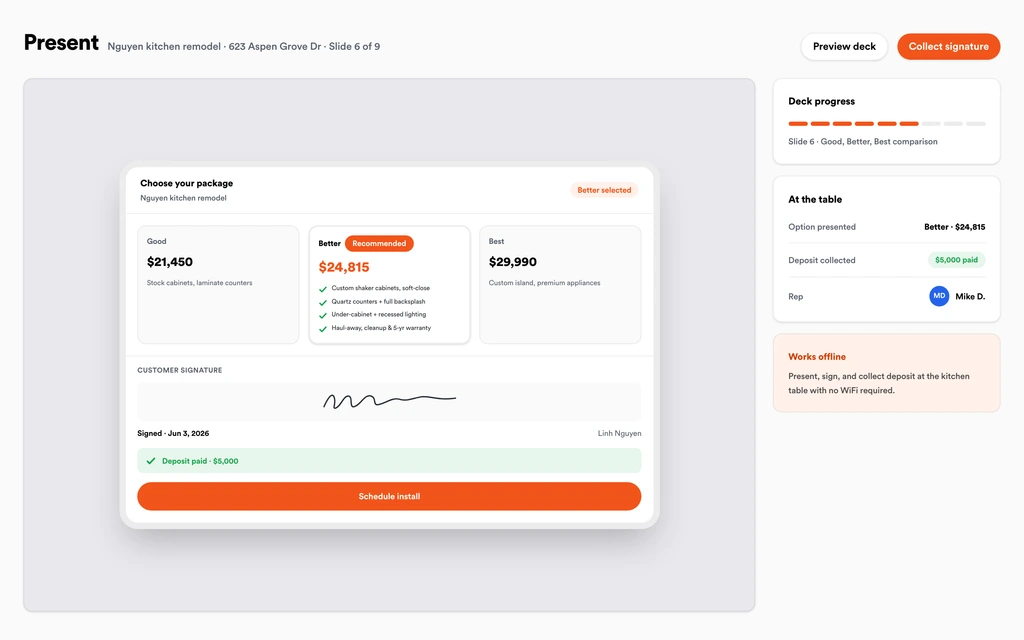
Job tracking and photosBuild the repair price and Good, Better, Best replacement tiers from your HVAC template, with a margin check on each tier. Walk the homeowner through the presentation at the kitchen table, show the monthly payment math, and take the signature and deposit in one step.
Sales presentationsRun the load calc in your usual tool and record the tonnage, equipment specs, and duct notes on the job. Put the changeout on the crew board, sync it to Google Calendar, and let crews clock in from the site with GPS.
SchedulingLog startup readings, refrigerant charge, static pressure, and before and after photos on the job. Store the permit sign-off and the equipment warranty with the serial numbers, then share it all in the homeowner portal.
Job tracking and photosInvoice from the job with any change orders already on it and collect with a text-to-pay link or the card on file. Enroll the customer in a maintenance agreement that tracks the new equipment, schedules the spring and fall visits, and charges the card on file each cycle.
Service agreementsSet up for the way HVAC jobs run.
Maintenance plans
Recurring jobs with automatic reminders that keep techs booked off-season.
System proposals
Good, Better, Best equipment options with clear pricing.
Scheduling and GPS clock-in
Lay out the week and confirm who is on site, in real time.
Deposit and final billing
Collect up front and on completion without chasing checks.
What to look for in HVAC software.
Take this list to any demo or trial, ours included. If a tool cannot show you each of these on a real job, keep looking.
Maintenance agreements that bill themselves
Agreements should charge the card on file every cycle, schedule the tune-ups, and renew automatically, so the membership base grows instead of lapsing quietly.
Equipment tracked under each customer
Model, serial, install date, and warranty belong on the customer record. When the unit fails, the tech should know its age before they ring the bell.
Repair vs replace in one presentation
Techs need to show the repair and the replacement tiers side by side at the house, with a signature and deposit collected in the same step.
Dispatch built for peak season
On the first hot week, the board fills fast. Look for a drag-and-drop crew board, a job map, and automatic appointment reminders to the homeowner.
Commissioning records on the job
Startup readings, charge, and photos protect you on warranty claims and callbacks. They should live on the job file, not in a tech's camera roll.
Deposit and final billing for installs
Changeouts carry real equipment cost. Take a deposit at signing and bill the balance on completion without rebuilding the invoice.
An honest answer on load calcs
Know whether the platform sizes systems. Revcore does not run Manual J, so plan on keeping your load calc software and entering the result.
Seats included for techs and installers
HVAC shops add service techs, install crews, and comfort advisors. Per-user pricing grows with every hire, so look for plans that include crew seats.
The whole platform comes standard.
Quoting is the start. Every HVAC account runs the full job, from the first lead to the final payment, in one login.
- CRM and pipelineEvery lead and job on one board
- Estimates and proposalsGood, Better, Best, signed on the spot
- Scheduling and dispatchCrews on one shared calendar
- CommunicationsTexts, calls, and email in one thread
- Invoicing and paymentsDeposits and finals, paid online
- Service agreementsRecurring work, tracked
- AutomationsFollow-ups that send themselves
- ReportingRevenue and close rate at a glance
HVAC software, by category
Looking for one piece? Each page shows how that part works for HVAC crews.
Comparing HVAC software?
Honest side-by-sides with the tools HVAC crews weigh most. Every plan is one flat price with crew seats included. See pricing.
- Revcore vs ServiceTitanEnterprise field service platform. Revcore is lighter to run, with flat pricing and seats included.
- Revcore vs Housecall ProPopular with residential service shops. Revcore adds the in-home presentation and margin checks per tier.
- Revcore vs FieldEdgeService and agreement focused. Revcore pairs agreements with the kitchen-table replacement close.
- Revcore vs JobberSimple scheduling and quoting. Revcore adds dispatch maps, agreements, and tiered install proposals.
- All comparisons →
“Service calls used to take days to bill. Now the tech collects on site and the payment is in before the truck leaves the driveway.”

Composite operator based on early-access usage. Outcomes are illustrative; individual results vary.






HVAC questions, answered.
Still deciding if Revcore fits your crew? Talk to our team.
What is the best software for HVAC contractors?
It depends on your size and mix of service and install work. Large multi-location shops often run ServiceTitan, and FieldEdge and Housecall Pro are common for residential service. Revcore Pro fits residential HVAC companies that want diagnostics, repair vs replace presentations, install scheduling, and maintenance agreements in one login, with crew seats included in a flat plan.
Can Revcore manage HVAC maintenance agreements?
Yes. Set agreements to bill monthly, quarterly, semiannually, or annually, schedule the tune-up visits, track the equipment covered under each plan, and let it auto-renew. The card on file is charged every cycle, and a recurring revenue view shows what the membership base brings in.
Does Revcore do Manual J load calculations?
No. Revcore does not calculate heating and cooling loads or size equipment. Run the load calc in the tool you already use, then record the tonnage, equipment choice, and duct notes on the job and build the proposal from your HVAC template.
How do techs present repair vs replace options?
Build a repair line and Good, Better, Best replacement tiers from the HVAC estimate template, with material and labor rates mapped to your zip code. The tech walks the homeowner through the built-in presentation on a tablet or phone, and the homeowner signs and pays the deposit right there.
Can I track equipment serial numbers and warranties?
Yes. Record model, serial, and install date on the job and under the customer's service agreement, and store the warranty paperwork on the job file. Custom fields let you add anything else your techs check, like filter size or refrigerant type.
Is homeowner financing built into Revcore for HVAC replacements?
Not yet. Built-in homeowner financing is on the roadmap. Today your comfort advisor can show monthly payment math in the in-home presentation next to each replacement tier, and you keep using your current lender for applications and approvals.
Does Revcore manage parts inventory on the truck?
No. Revcore does not track truck stock or order parts from distributors. Techs log the materials used on each job, and those carry onto the invoice, but stock levels stay in your current system or on the supply house account.
Does it work on my phone in the field?
Yes. Revcore runs on the web, iOS, and Android, so HVAC crews can open the job, add photos, take a signature, and collect payment from the site.
How fast can we switch over?
Most crews are live within a week. Paid plans include hands-on onboarding: we import your customers and pricing, set up your proposal templates, and add your team, then check in until it sticks.
What does Revcore Pro cost for HVAC?
Plans start at $249/mo billed monthly ($207/mo on annual billing, 2 months free) with crew seats included, plus CRM, estimating, scheduling, and invoicing. Every plan includes a 14-day free trial with no credit card required.







