Close the system at the kitchen table.
Solar is a high-ticket sale that needs a sharp presentation and tight install coordination. Revcore helps you present tiered system options, document the install, and collect across every milestone.
14-day free trial, no credit card required.

What solar contractors need from software
Solar installers need software that supports a long, high-ticket sale and a production process full of milestones: site survey, proposal, contract, permitting, install, inspection, interconnection, and permission to operate. Revcore Pro runs the in-home presentation with tiered system options and monthly payment math, keeps survey and install records on the job, and collects deposits and milestone payments in one login. It does not design arrays or model production, so most installers pair it with a solar design tool.
Where solar jobs get stuck.
The same few things cost solar crews time and money on every job. This is what Revcore takes off your plate.
- 01
Presentations that do not land
Show tiered system options, with the monthly payment math, that make the upgrade an easy yes.
- 02
Permitting and inspection paperwork
Capture every photo and spec and tag it to the job for sign-off and warranties.
- 03
Milestone payments delayed
Collect deposits and progress payments with fast payouts.
How a solar job runs in Revcore.
From the first call to the final payment, every step happens on the same job record, so nobody retypes anything and nothing waits on the office.





Solar job, example
Capture and qualify the lead
1/7




Web forms and door knock leads land on the pipeline with their source attached. A qualification survey collects the utility, average bill, roof age, and shading notes before a rep books the appointment.
SurveysPhotograph the roof planes, the attic, the main panel, and the meter, and mark up anything that affects the install. Survey notes, your measurements, and the design from your solar tool go on the job file.
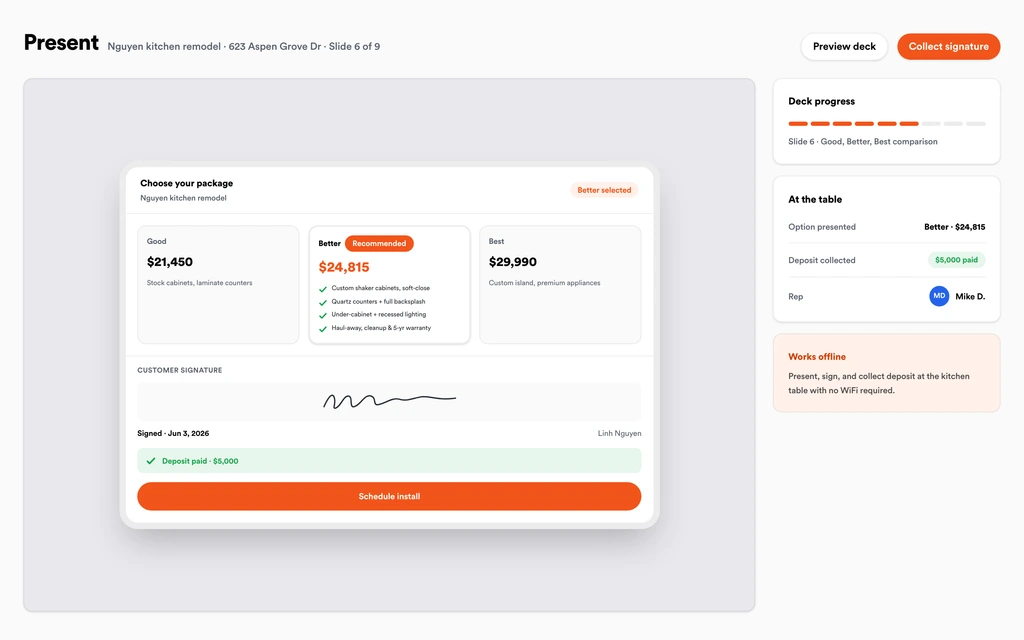
Job tracking and photosWalk the homeowner through the in-home presentation with system size tiers, battery add-ons, and the monthly payment math. The presentation runs on your device, so a weak signal in the living room does not stall the close.
Sales presentationsThe homeowner e-signs the agreement and pays the deposit in the same step, and the approved estimate becomes a job with no retyping. The contract, specs, and utility bill are stored on the job file.
EstimatesRecord permit numbers and inspection dates on the job, then book the install crew once approvals are in and equipment is on site. The homeowner follows progress, photos, and documents in the branded portal without calling the office.
Homeowner portalCrews clock in from the roof with GPS and shoot racking, conduit runs, labeling, and the inverter or battery. Store the inspection sign-off, panel and inverter serials, and warranties on the job for interconnection and any future service call.
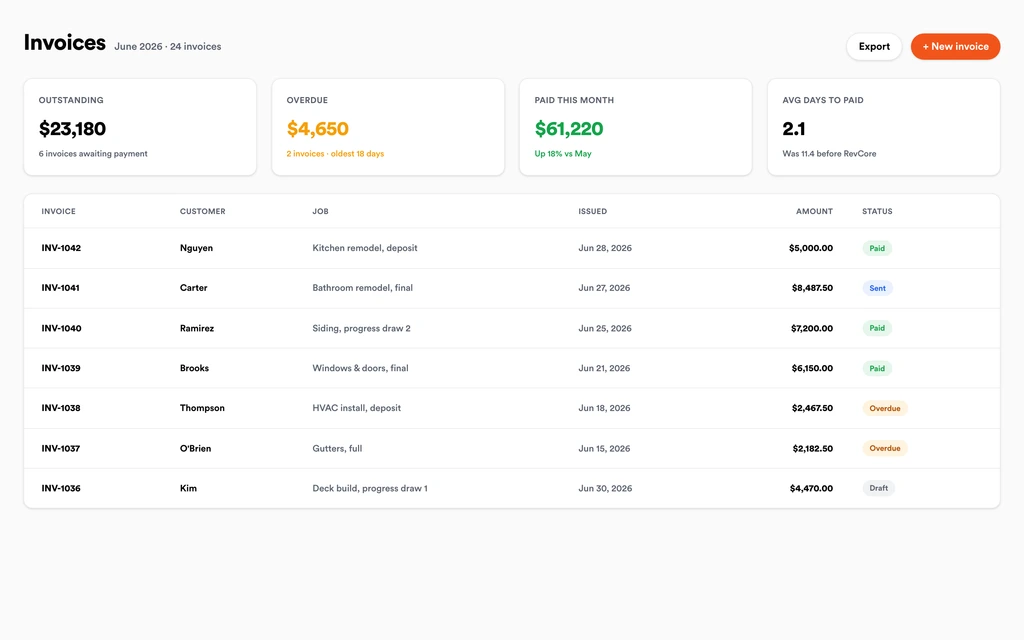
SchedulingBill deposit, install complete, and permission to operate as separate milestones, or progress bill by percentage complete. Homeowners pay by card or ACH from a text or email link, and payouts land in 1 to 2 business days, or instantly for eligible accounts.
InvoicingSet up for the way solar jobs run.
Sales presentations
Polished, tiered proposals customers compare and approve on the spot.
Photo job reports
Site survey through final install assembled automatically for every project.
Install scheduling
Coordinate crews, permits, and inspections so installs do not slip.
Milestone payments
Deposits, draws, and finals collected without the bank runs.
What to look for in solar software.
Take this list to any demo or trial, ours included. If a tool cannot show you each of these on a real job, keep looking.
A presentation built for the kitchen table
Solar is a considered purchase. Look for a presentation with tiered systems and payment math that runs well on a tablet in the home.
Milestone billing through PTO
Deposit, install, and permission to operate are separate payments. Your invoicing should bill each one on schedule without a side spreadsheet.
A clear pipeline from sale to PTO
Jobs sit for weeks in permitting and interconnection. Stages on one board show which projects are stuck, where, and for how long.
Site survey and install photo records
Roof, attic, panel, and install photos protect you with inspectors and on warranty claims. They should live on the job, not in a shared drive.
A homeowner portal for long timelines
Solar customers wait on permits and utilities. A portal with progress, photos, and documents answers the where-are-we question for you.
Rep performance and lead source reporting
Solar sales teams need to know which reps close and which lead sources turn into signed contracts, not just booked appointments.
An honest answer on design tools
Know whether the platform designs arrays. Revcore does not model production, shading, or layouts, so keep your solar design software.
The whole platform comes standard.
Quoting is the start. Every solar account runs the full job, from the first lead to the final payment, in one login.
- CRM and pipelineEvery lead and job on one board
- Estimates and proposalsGood, Better, Best, signed on the spot
- Scheduling and dispatchCrews on one shared calendar
- CommunicationsTexts, calls, and email in one thread
- Invoicing and paymentsDeposits and finals, paid online
- Service agreementsRecurring work, tracked
- AutomationsFollow-ups that send themselves
- ReportingRevenue and close rate at a glance
Solar software, by category
Looking for one piece? Each page shows how that part works for solar crews.
Comparing solar software?
Honest side-by-sides with the tools solar crews weigh most. Every plan is one flat price with crew seats included. See pricing.
- Revcore vs LeapIn-home sales presentations. Revcore adds the install, job file, and milestone payments.
- Revcore vs IngagePresentation software for in-home sales. Revcore puts the close and production in one login.
- Revcore vs Salesforce Field ServiceHighly customizable enterprise CRM. Revcore ships ready for contractors without a build-out.
- Revcore vs HubSpotMarketing and sales CRM. Revcore adds scheduling, job records, and payments for installs.
- Revcore vs BuildertrendConstruction project management. Revcore is built around the residential sale and service.
- All comparisons →
“Service calls used to take days to bill. Now the tech collects on site and the payment is in before the truck leaves the driveway.”

Composite operator based on early-access usage. Outcomes are illustrative; individual results vary.






Solar questions, answered.
Still deciding if Revcore fits your crew? Talk to our team.
What is the best software for solar companies?
Most solar installers use a design tool for layouts and production estimates alongside a CRM for the sale and install. Salesforce and HubSpot are common CRMs for larger sales teams, and LEAP and Ingage are used for in-home presentations. Revcore Pro fits installers that want the presentation, contract, install records, and milestone payments in one login.
Does Revcore design solar arrays or estimate production?
No. Revcore does not create panel layouts, shade reports, or production models, and it does not measure roofs. Most installers design in their solar design tool, then bring the system size and equipment into a Revcore solar template for the proposal.
Does Revcore include solar loans?
Not yet. Built-in homeowner financing is on the roadmap. Today you can show monthly payment math inside the presentation next to each system tier and keep using your current solar lender or PPA partner for applications, approvals, and funding.
Can Revcore track permitting and interconnection?
Yes, as stages on the pipeline and records on the job. Store permit numbers, inspection dates, utility paperwork, and sign-off photos on the job file. Pipeline stages show which projects are waiting on the city and which on the utility. Revcore does not submit permits or interconnection applications for you.
How do I bill solar milestones?
Set up milestone billing for the deposit, install complete, and permission to operate, or bill by percentage complete. Each invoice goes out by text or email, the homeowner pays by card or ACH, and payouts land in 1 to 2 business days, or instantly for eligible accounts.
Can I sell batteries and EV chargers as add-ons?
Yes. Build them as higher tiers or optional line items in the solar template so the homeowner sees a system with and without storage. Each tier shows a margin check before you present it, and the homeowner can pick a tier and sign in the same presentation.
Can my solar sales team use Revcore on their own devices?
Yes. Reps work leads from the pipeline on a phone or tablet, run the in-home presentation, and close at the table. Role-based access keeps billing and install scheduling with the office, and reporting shows pipeline and close performance by rep.
Does it work on my phone in the field?
Yes. Revcore runs on the web, iOS, and Android, so solar crews can open the job, add photos, take a signature, and collect payment from the site.
How fast can we switch over?
Most crews are live within a week. Paid plans include hands-on onboarding: we import your customers and pricing, set up your proposal templates, and add your team, then check in until it sticks.
What does Revcore Pro cost for solar?
Plans start at $249/mo billed monthly ($207/mo on annual billing, 2 months free) with crew seats included, plus CRM, estimating, scheduling, and invoicing. Every plan includes a 14-day free trial with no credit card required.







