Quote the whole elevation in one visit.
Siding jobs live or die on accurate square footage and clear material choices. Revcore helps you measure, price, and present the upgrade so homeowners say yes before you leave.
14-day free trial, no credit card required.

What siding contractors need from software
Siding contractors need software that turns wall squares, openings, and trim runs into a clear material choice, then carries the approved color and profile all the way to the install crew. Revcore Pro prices the elevation from the quantities your estimator enters, presents vinyl, fiber cement, and trim tiers at the table, and collects the deposit with the signature. It does not measure the house for you, so crews use a tape, a laser, or a report they already buy.
Where siding jobs get stuck.
The same few things cost siding crews time and money on every job. This is what Revcore takes off your plate.
- 01
Measuring elevations by hand
Capture wall dimensions and openings on site and turn them into a priced estimate in minutes.
- 02
Material choices that confuse buyers
Show fiber cement, vinyl, and trim options side by side with clear pricing.
- 03
Color and trim changes after the fact
Log selections on the job file so the crew installs exactly what was approved.
How a siding job runs in Revcore.
From the first call to the final payment, every step happens on the same job record, so nobody retypes anything and nothing waits on the office.





Siding job, example
Book the in-home appointment
1/7




Leads from your site forms land on the pipeline, and two-way texting lets you reply while the homeowner is still comparing quotes. The office books the appointment on the estimator's calendar while the homeowner is still on the thread, instead of trading callbacks.
CRM and pipelinePhotograph each side of the house, the rot at the sill plates, the soffit and fascia, and any loose or cracked panels. Enter your wall squares, openings, and linear feet of trim, and mark up photos so the homeowner sees exactly what you saw.
Job tracking and photosStart from saved assemblies for tear-off, housewrap, siding by the square, corners, J-channel, and trim wrap. Material and labor rates map to your zip code, and a margin check on each tier keeps an upgrade in insulated vinyl or fiber cement from eating the profit.
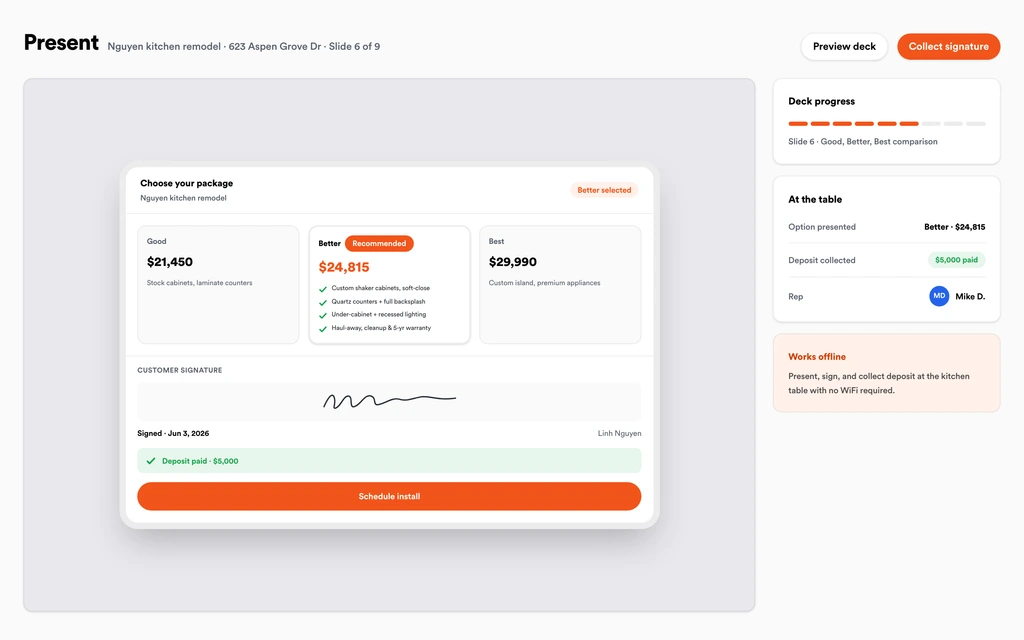
EstimatesRun the in-home presentation with Good, Better, Best packages and monthly payment math on screen. Once the homeowner picks the profile, color, and trim, they sign and pay the deposit in the same step, and the selections ride onto the job.
Sales presentationsPut the job on the crew board once the siding and trim are confirmed for delivery, then drag it if the drop slips. The homeowner gets a text with the new date, and installers clock in from the site with GPS.
SchedulingWhen tear-off exposes soft sheathing or a rotted band board, shoot it, price it, and send it through the homeowner portal. The homeowner approves from their phone, and the change order rolls onto the final invoice.
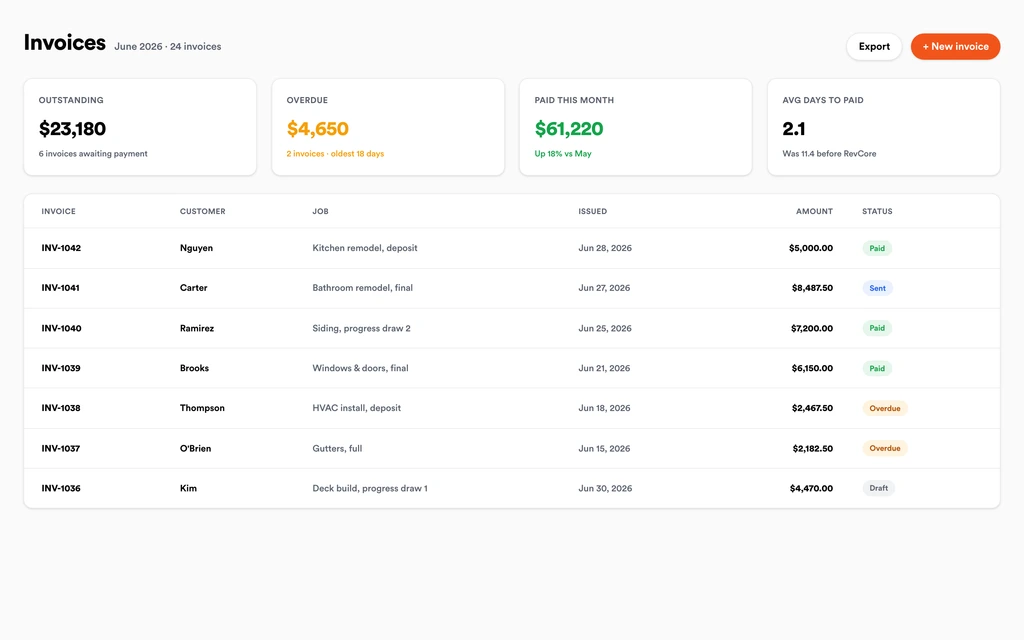
Homeowner portalShare the finished elevations in the portal, store the manufacturer warranty on the job, and invoice the balance with every change order already included. Send a text-to-pay link, and payouts land in 1 to 2 business days, or instantly for eligible accounts.
InvoicingSet up for the way siding jobs run.
Visual proposals
Tiered material and color options that help homeowners picture the finished house.
Takeoff-ready estimates
Price by square foot and linear foot with your real material costs built in.
Selection tracking
Lock colors, profiles, and trim on the job so nothing gets installed twice.
Deposit billing
Collect a deposit on approval and bill the balance at completion.
What to look for in siding software.
Take this list to any demo or trial, ours included. If a tool cannot show you each of these on a real job, keep looking.
Estimates built on squares and linear feet
Siding is priced by the square and trim by the foot. Your estimating tool should hold both in saved assemblies so every estimator quotes the same way.
Side by side material tiers
Homeowners weigh vinyl against insulated vinyl against fiber cement. Look for Good, Better, Best packages with a margin check so the premium option still pays you.
Selections stored on the job
Color, profile, exposure, and trim choices need to live on the job file the crew opens, not in a salesperson's notebook or a text thread.
A presentation that works at the table
Siding is usually sold in one visit. The presentation should run on your device, show the options clearly, and take the signature and deposit before you leave.
Change orders for hidden rot
Tear-off always finds something. You need a fast way to photograph damaged sheathing, price the repair, and get the homeowner's approval before the crew keeps going.
Crew scheduling tied to deliveries
Installs move when the material drop moves. Rescheduling should take a drag on the crew board, and the homeowner should hear about it by text automatically.
Photos that protect the warranty
Before and after photos of each elevation, stored on the job with the manufacturer warranty, settle questions about installation years after the crew leaves.
An honest answer on measuring
Know whether a platform measures houses or expects you to. Revcore does not measure elevations, so your estimator enters squares and openings from a tape, laser, or report.
The whole platform comes standard.
Quoting is the start. Every siding account runs the full job, from the first lead to the final payment, in one login.
- CRM and pipelineEvery lead and job on one board
- Estimates and proposalsGood, Better, Best, signed on the spot
- Scheduling and dispatchCrews on one shared calendar
- CommunicationsTexts, calls, and email in one thread
- Invoicing and paymentsDeposits and finals, paid online
- Service agreementsRecurring work, tracked
- AutomationsFollow-ups that send themselves
- ReportingRevenue and close rate at a glance
Siding software, by category
Looking for one piece? Each page shows how that part works for siding crews.
Comparing siding software?
Honest side-by-sides with the tools siding crews weigh most. Every plan is one flat price with crew seats included. See pricing.
- Revcore vs LeapIn-home sales tool used by exterior remodelers. Revcore adds production and payments in one login.
- Revcore vs IngagePresentation software for home improvement sales. Revcore pairs the presentation with the job file.
- Revcore vs JobNimbusExterior and roofing CRM with boards. Revcore adds tiered estimates and fast payouts.
- Revcore vs Improveit 360CRM built for larger home improvement sales teams. Revcore is flat priced with seats included.
- Revcore vs CompanyCamPhoto documentation app. Revcore keeps elevation photos inside the full job file.
- All comparisons →
“We quote right on the property and the homeowner has real options before we pack up. Deposits clear before we leave the driveway.”

Composite operator based on early-access usage. Outcomes are illustrative; individual results vary.






Siding questions, answered.
Still deciding if Revcore fits your crew? Talk to our team.
What is the best software for siding contractors?
It depends on how you sell. Siding companies that close in the home need photo documentation, square and trim pricing, tiered material options, a deposit at signing, and crew scheduling. Revcore Pro puts that whole job in one login with seats included. LEAP and Ingage are common choices for the in-home sales piece, and JobNimbus is popular with exterior contractors who also do roofing.
How do I price a siding job by the square in Revcore?
Enter the wall squares, openings, and linear feet of trim you measured, then pull saved assemblies for tear-off, housewrap, siding, corners, and trim. Material and labor rates are mapped to your zip code and you can adjust them. The estimate totals each tier and shows the margin before you present it.
Can Revcore measure a house for siding?
No. Revcore does not take aerial measurements or do automatic takeoffs. Estimators measure on site with a tape or laser, or use a report they already order, and enter the squares and openings into the siding template to build the estimate.
How do I show vinyl versus fiber cement to a homeowner?
Build Good, Better, Best tiers in the estimate, for example standard vinyl, insulated vinyl, and fiber cement with upgraded trim, then walk through them in the in-home presentation. Monthly payment math can sit next to each option, and the homeowner signs and pays the deposit on the tier they choose.
How do I keep the crew from installing the wrong color?
The approved profile, color, and trim selections stay on the job file from the signed estimate. The crew opens the same file on their phones, along with photos and notes, so nobody is working from a copy of a copy.
What happens when tear-off exposes rotted sheathing?
Photograph the damage, price the repair from your saved line items, and send it as a change request through the homeowner portal. The homeowner approves and signs from their phone, and the approved change order lands on the final invoice automatically.
Can I bill a deposit, a material payment, and a final?
Yes. Collect the deposit at signing, then set up milestone billing for the material drop and the completion. Each invoice goes out by text or email, and the homeowner can pay by card or ACH from the link. The deposit and any earlier payments are already credited, so the final shows only what is still owed.
Does it work on my phone in the field?
Yes. Revcore runs on the web, iOS, and Android, so siding crews can open the job, add photos, take a signature, and collect payment from the site.
How fast can we switch over?
Most crews are live within a week. Paid plans include hands-on onboarding: we import your customers and pricing, set up your proposal templates, and add your team, then check in until it sticks.
What does Revcore Pro cost for siding?
Plans start at $249/mo billed monthly ($207/mo on annual billing, 2 months free) with crew seats included, plus CRM, estimating, scheduling, and invoicing. Every plan includes a 14-day free trial with no credit card required.







