Run every project from one screen.
Juggling subs, change orders, and draws across a dozen jobs? Revcore keeps every project, document, and dollar in one place, so nothing slips between the office and the field.
14-day free trial, no credit card required.

What general contracting contractors need from software
General contractors need one place to hold the bid, the signed scope, the change orders, the plans and permits, the crew schedule, and the draw schedule for every open project. Revcore Pro keeps each project on one job file with a homeowner portal for approvals, change orders that roll onto the invoice, and progress or milestone billing. It does not do Gantt scheduling or detailed job costing, so larger commercial builders often keep a dedicated construction platform.
Where general contracting jobs get stuck.
The same few things cost general contracting crews time and money on every job. This is what Revcore takes off your plate.
- 01
Change orders that go untracked
Capture and price changes on site, get sign-off on the spot, and bill them so margin does not leak.
- 02
Subs and schedules out of sync
Assign work by crew and trade, and everyone sees the same plan in real time.
- 03
Draws and invoices that lag
Bill progress straight from the job and collect by card or ACH from a text link.
How a general contracting job runs in Revcore.
From the first call to the final payment, every step happens on the same job record, so nobody retypes anything and nothing waits on the office.




General Contracting job, example
Qualify the project before you drive out
1/7




Web forms land on the pipeline as leads. A qualification survey asks about scope, timeline, and budget range up front, so you spend site visits on projects that fit and pass on the ones that do not.
SurveysShoot existing conditions, take your own measurements, and build the estimate from saved assemblies for demo, framing, drywall, and finish. Labor and material rates start from your zip code and you adjust them to your subs' real numbers before anything goes out.
EstimatesSend the scope to the owner's phone with the contract attached. They review it, e-sign, and pay the deposit in one step, and the signed estimate becomes the job with every line item intact, so nobody retypes the bid into a production system.
EstimatesDrawings, the permit card, engineering letters, specs, and the signed contract live on the project file. Your superintendent and foremen get role-based access from the field, so the crew framing the wall is looking at the same revision the office is.
Job tracking and photosDrop demo, rough-in, inspections, and finish days onto the crew board and drag them when an inspection slips. Two-way Google Calendar sync keeps outside calendars current, and GPS clock-in shows who was on site and for how long.
SchedulingWhen the owner asks for another outlet or the wall opens up rotted framing, price the change and send it through the homeowner portal. They approve and sign from their phone, and the change order rolls onto the next invoice automatically.
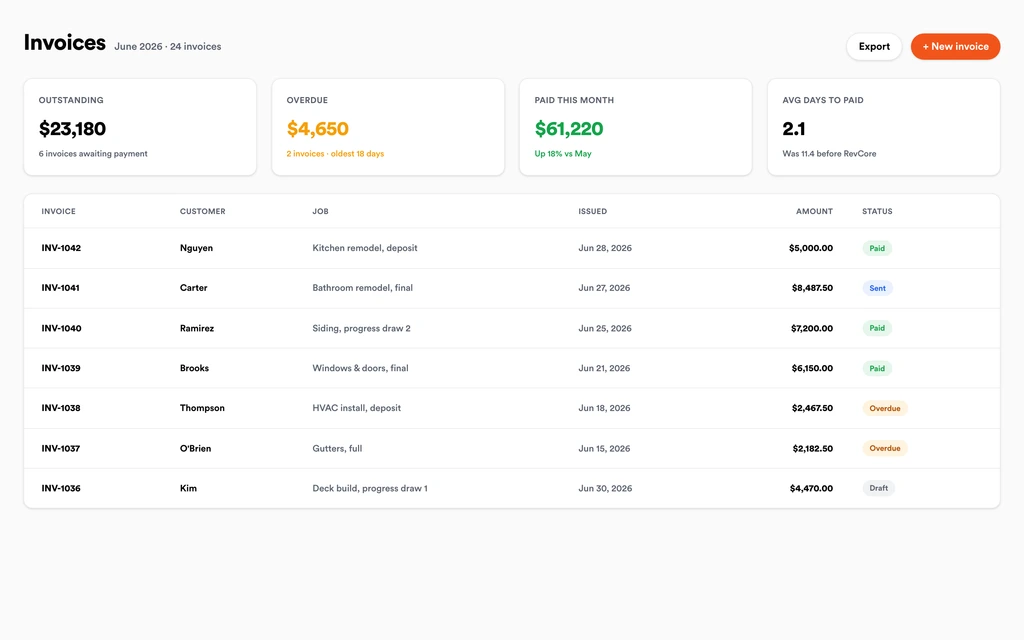
Homeowner portalInvoice by percentage complete or by milestone straight from the job, with approved change orders already on it. Automatic reminders chase the open draw, the owner pays by card or ACH from a link, and payouts land in 1 to 2 business days, or instantly for eligible accounts.
InvoicingSet up for the way general contracting jobs run.
Project pipeline
Track every job from bid to punch list with stages that match how you actually build.
Document control
Plans, permits, and photos tagged to the right project, available to the whole crew.
Tiered proposals
Send Good, Better, Best scopes clients approve from their phone.
Progress billing
Invoice by milestone or percentage complete and collect the day you finish.
What to look for in general contracting software.
Take this list to any demo or trial, ours included. If a tool cannot show you each of these on a real job, keep looking.
Change orders that reach the invoice
A signed change order is only money if it gets billed. Look for approvals that land on the next draw without anyone copying numbers from a text thread.
Progress and milestone billing
Residential GC work runs on draws. The software should bill by percentage complete or by stage, and show what has been billed against the contract.
Plans and permits on the job file
The field should never build off an old revision. Keep drawings, permits, specs, and inspection photos tied to the project and visible on a phone.
Role-based access for supers and foremen
Your superintendent needs the schedule and plans, not the margin on every bid. Look for permissions by role rather than one shared login.
An owner portal that cuts the calls
Owners call when they cannot see progress. A branded portal with photos, a timeline, and documents answers most of those calls before they happen.
Estimates built from assemblies
Saved assemblies for walls, openings, and finishes keep bids consistent across estimators. Starting every bid from a blank spreadsheet is where margin mistakes creep in.
An honest answer on job costing
Know whether you need Gantt charts and cost codes. Revcore does not do detailed job costing, so large commercial builders may still want a dedicated construction platform.
The whole platform comes standard.
Quoting is the start. Every general contracting account runs the full job, from the first lead to the final payment, in one login.
- CRM and pipelineEvery lead and job on one board
- Estimates and proposalsGood, Better, Best, signed on the spot
- Scheduling and dispatchCrews on one shared calendar
- CommunicationsTexts, calls, and email in one thread
- Invoicing and paymentsDeposits and finals, paid online
- Service agreementsRecurring work, tracked
- AutomationsFollow-ups that send themselves
- ReportingRevenue and close rate at a glance
General Contracting software, by category
Looking for one piece? Each page shows how that part works for general contracting crews.
Comparing general contracting software?
Honest side-by-sides with the tools general contracting crews weigh most. Every plan is one flat price with crew seats included. See pricing.
- Revcore vs BuildertrendConstruction platform with Gantt and job costing. Revcore leans toward selling and billing homeowner projects.
- Revcore vs Contractor ForemanBroad construction toolset at a low price. Revcore focuses on the sale, portal, and payments.
- Revcore vs Improveit 360Remodeler CRM for in-home sales teams. Revcore adds production, portal, and payments in one login.
- Revcore vs JobberPopular for service work. Revcore adds change orders and draw billing for longer projects.
- All comparisons →
“Tiered proposals changed how we sell remodels. Most homeowners pick the middle option on their own, and our average job climbed.”

Composite operator based on early-access usage. Outcomes are illustrative; individual results vary.






General Contracting questions, answered.
Still deciding if Revcore fits your crew? Talk to our team.
What is the best software for general contractors?
It depends on the size and type of work. Residential GCs who sell to homeowners need bids, contracts, change orders, plans, scheduling, and draws in one place, and Revcore Pro covers that on one job file. Buildertrend is a common choice for builders who want Gantt schedules and job costing, and Contractor Foreman is a lower cost construction option with a broad feature list.
How do I track change orders so they actually get billed?
Price the change on the job, send it through the homeowner portal, and have the owner sign from their phone before the work starts. In Revcore, approved change orders roll onto the next invoice automatically, so extra scope shows up on the draw instead of getting forgotten at closeout.
Can I bill by draw schedule or percentage complete?
Yes. Set up a deposit, then bill milestones like rough-in and drywall, or bill by percentage complete as the project moves. Each invoice comes from the job with change orders included, reminders go out on their own, and payouts land in 1 to 2 business days, or instantly for eligible accounts.
Does Revcore do Gantt charts or job costing?
No. Revcore schedules work on a drag-and-drop crew board with day, week, and month views, and reports on pipeline, revenue, and performance by rep or crew. It does not build Gantt dependencies or track costs against cost codes. Builders who rely on those usually keep a construction platform like Buildertrend.
Where do plans, permits, and lien paperwork live?
On the project's job file. Upload drawings, permits, specs, contracts, warranties, and any signed paperwork, and give supers and foremen role-based access from the field. Inspection photos and notes sit on the same file. Revcore stores permits but does not file them with the building department.
Can subcontractors see the schedule?
You can give team members role-based access so they see the jobs and schedule that apply to them, and two-way Google Calendar sync pushes dates to outside calendars. Many GCs put sub dates on the crew board so the whole sequence is visible, then text the sub directly from the job.
Does it sync with QuickBooks?
On the Scale plan, Revcore connects to QuickBooks Online and imports your customers and the last 12 months of invoices, so you start with your history. It does not send invoices or payments back to QuickBooks yet. Every plan can download a full export of its data for your bookkeeper.
Does it work on my phone in the field?
Yes. Revcore runs on the web, iOS, and Android, so general contracting crews can open the job, add photos, take a signature, and collect payment from the site.
How fast can we switch over?
Most crews are live within a week. Paid plans include hands-on onboarding: we import your customers and pricing, set up your proposal templates, and add your team, then check in until it sticks.
What does Revcore Pro cost for general contracting?
Plans start at $249/mo billed monthly ($207/mo on annual billing, 2 months free) with crew seats included, plus CRM, estimating, scheduling, and invoicing. Every plan includes a 14-day free trial with no credit card required.







