Service call to new door, all on one login.
Garage door work runs from quick spring repairs to full replacements. Revcore helps you dispatch fast, present door options, and collect before the truck leaves the curb.
14-day free trial, no credit card required.

What garage doors contractors need from software
Garage door companies need software that dispatches broken spring and off track calls fast, lets the tech present a replacement door or opener on the spot, and collects before the truck leaves. Revcore Pro puts the call on an open tech from the crew board, sends the homeowner automatic appointment reminders, builds tiered door and opener options, and takes payment in the driveway. It also runs annual tune-up plans with scheduled visits and automatic billing.
Where garage doors jobs get stuck.
The same few things cost garage doors crews time and money on every job. This is what Revcore takes off your plate.
- 01
Emergency repairs that need a fast tech
Book the call and assign it to an open tech in seconds.
- 02
Replacements that need a clean pitch
Show door styles, windows, and opener options with tiered pricing.
- 03
Waiting on payment for service
Collect on completion with card or ACH before the truck leaves.
How a garage doors job runs in Revcore.
From the first call to the final payment, every step happens on the same job record, so nobody retypes anything and nothing waits on the office.




Garage Doors job, example
Answer the broken spring call
1/7




A broken spring means a car stuck in the garage, and that homeowner calls the next company if nobody answers. Web form requests land on the pipeline as leads, and two-way texting lets you reply in seconds.
CommunicationsDrag the emergency onto an open tech on the crew board, and it lands on their phone with directions to the stop. The homeowner gets an automatic appointment confirmation by text, and the tech clocks in with GPS when they pull in.
Field and dispatchPhotograph the broken torsion spring, frayed cables, bent track, or failed opener, and note the door size and spring spec. Price the repair from saved line items, including springs, cables, rollers, and the tune-up, and send it to the homeowner's phone.
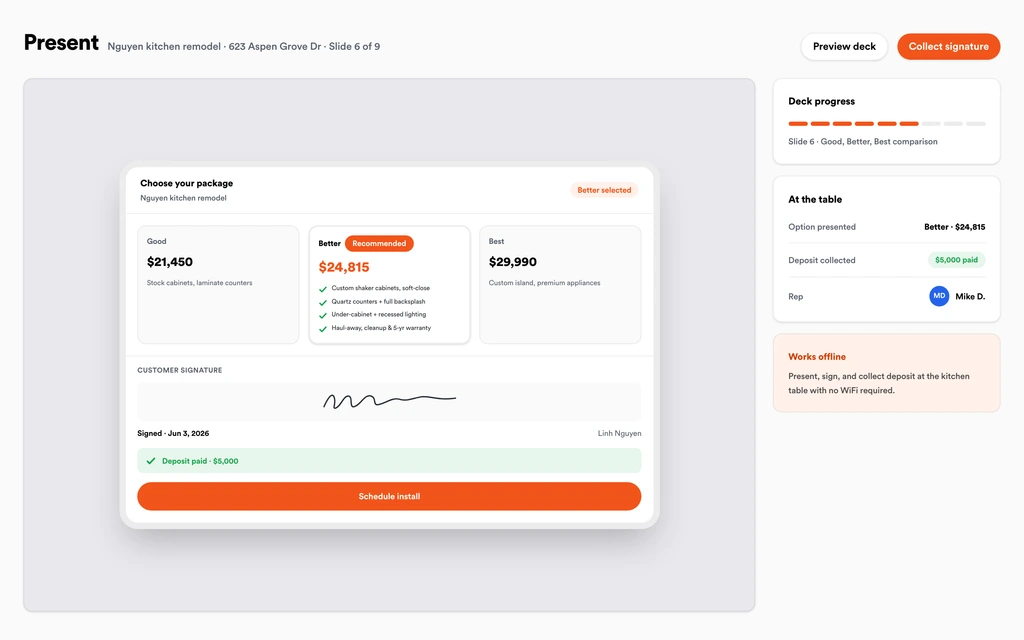
Job tracking and photosOn an old or damaged door, present a repair option next to Good, Better, Best replacement doors and openers, with monthly payment math if it helps. The homeowner signs and pays the deposit on the spot.
Sales presentationsOnce the door is ordered, put the install on the board with the style, size, color, windows, and opener saved on the job. The homeowner gets a reminder text, and the installer clocks in from the driveway with GPS.
SchedulingInvoice from the finished job, then charge the card on file or send a text-to-pay link while the tech is still in the driveway. Payouts land in 1 to 2 business days, or instantly for eligible accounts, and a review request goes out automatically.
PaymentsOffer an annual maintenance plan that schedules a lube and safety check, charges the card on file each cycle, and renews automatically. Log the door, springs, and opener under the plan so the next tech knows what is there.
Service agreementsSet up for the way garage doors jobs run.
Fast dispatch
Assign repairs by territory and see who is clocked in on site.
Door proposals
Tiered door and opener packages customers approve on the spot.
Job photos and notes
Document the spring, panel, or opener fix on the customer history.
Field payments
Send a text-to-pay link before you pull out of the driveway.
What to look for in garage doors software.
Take this list to any demo or trial, ours included. If a tool cannot show you each of these on a real job, keep looking.
Dispatch to a nearby tech
Spring calls are urgent and first to arrive usually wins. Look for fast assignment and a job map so the call goes to a tech working nearby today.
Appointment texts for the homeowner
A homeowner stuck at home wants to know when you are coming. Automatic appointment confirmations and reminders cut down on calls.
Repair and replace options on one quote
Many replacement doors are sold on a repair call. The tech should be able to show the repair beside replacement tiers without calling the office.
Door and opener specs on the job
Size, style, color, insulation, windows, and opener model need to live on the job, so the order and the install match the signed quote.
Payment before leaving the driveway
Service tickets should be closed on site. Text-to-pay links let the tech collect card or ACH before the next call.
Tune-up plans with automatic billing
Annual maintenance plans bring customers back. You need scheduled visits, card on file billing, and equipment tracked under each plan.
Performance by tech
When techs sell replacements on service calls, you want to see revenue by tech and which lead sources are sending the calls.
The whole platform comes standard.
Quoting is the start. Every garage doors account runs the full job, from the first lead to the final payment, in one login.
- CRM and pipelineEvery lead and job on one board
- Estimates and proposalsGood, Better, Best, signed on the spot
- Scheduling and dispatchCrews on one shared calendar
- CommunicationsTexts, calls, and email in one thread
- Invoicing and paymentsDeposits and finals, paid online
- Service agreementsRecurring work, tracked
- AutomationsFollow-ups that send themselves
- ReportingRevenue and close rate at a glance
Garage Doors software, by category
Looking for one piece? Each page shows how that part works for garage doors crews.
Comparing garage doors software?
Honest side-by-sides with the tools garage doors crews weigh most. Every plan is one flat price with crew seats included. See pricing.
- Revcore vs ServiceTitanEnterprise field service platform. Revcore is flat priced with dispatch and tiered quotes included.
- Revcore vs Housecall ProService business app for small teams. Revcore adds in-home presentations for door replacements.
- Revcore vs WorkizPhone focused field service software. Revcore adds tiered door proposals and homeowner portal.
- Revcore vs JobberField service app for quoting and scheduling. Revcore adds tiered door and opener quotes and crew seats included in a flat plan.
- All comparisons →
“We quote right on the property and the homeowner has real options before we pack up. Deposits clear before we leave the driveway.”

Composite operator based on early-access usage. Outcomes are illustrative; individual results vary.






Garage Doors questions, answered.
Still deciding if Revcore fits your crew? Talk to our team.
What is the best software for garage door companies?
Garage door companies run fast service calls and bigger replacement sales side by side, so dispatch and tiered quoting both matter. Revcore Pro covers both in one login with seats included. ServiceTitan is common with larger multi-truck operations, and Housecall Pro and Workiz are popular with smaller service companies that live on the phones.
How do I dispatch garage door repair calls faster?
Drag the call onto an open tech on the crew board, and it shows up on their phone with directions to the stop. The homeowner gets an automatic appointment confirmation by text, and two-way texting keeps the conversation on the job.
Can my techs sell a new door on a repair call?
Yes. The tech can build a repair option next to Good, Better, Best replacement doors and openers from saved line items, present them on their device, and take the signature and deposit on the spot. The door and opener choices carry onto the job, so the office can order from the signed spec without calling the tech back.
Can I run garage door tune-up plans?
Yes. Service agreements can bill monthly, quarterly, semiannually, or annually, schedule the tune-up visits, charge the card on file every cycle, and renew automatically. You can track the door, springs, and opener under each plan. The next tech arrives knowing the spring spec and opener model, and the recurring revenue view shows how the plans add up.
Does Revcore track spring and parts inventory?
No. Revcore does not manage inventory or parts stock. You can record the spring size, wire gauge, and parts used on each job, and keep your common parts as saved line items for pricing. Most shops keep counting truck stock the way they do today and use Revcore for the call, the quote, and the payment.
How do techs get paid on site?
The tech can charge the customer's card on file or send a text-to-pay link for card or ACH. Payments are logged on the job, and payouts land in 1 to 2 business days, or instantly for eligible accounts. Margin Protection can fold the card fee into the price, so taking a card on a spring replacement does not cut into the ticket.
Can I see which techs sell the most replacements?
Yes. Reporting shows revenue and performance by rep or crew, and lead source attribution shows which sources turned into paid jobs. You can export reports as PDFs for team meetings. Seeing replacement sales next to service revenue by tech shows who is presenting the new door option and who is only fixing springs.
Does it work on my phone in the field?
Yes. Revcore runs on the web, iOS, and Android, so garage doors crews can open the job, add photos, take a signature, and collect payment from the site.
How fast can we switch over?
Most crews are live within a week. Paid plans include hands-on onboarding: we import your customers and pricing, set up your proposal templates, and add your team, then check in until it sticks.
What does Revcore Pro cost for garage doors?
Plans start at $249/mo billed monthly ($207/mo on annual billing, 2 months free) with crew seats included, plus CRM, estimating, scheduling, and invoicing. Every plan includes a 14-day free trial with no credit card required.







