Build the backyard, draw by draw.
Pool builds are long, high-value projects with many phases. Revcore keeps the design, permits, subs, and draws connected so the project flows from dig to first swim.
14-day free trial, no credit card required.

What pools contractors need from software
Pool builders run long, phased projects: a detailed bid for the shell, deck, and features, permits and plans, excavation through plaster and startup, and draws at every phase. Revcore Pro keeps the proposal, documents, crew and sub schedule, homeowner updates, and phase draws on one project, and service companies can run weekly visits with monthly maintenance plans.
Where pools jobs get stuck.
The same few things cost pools crews time and money on every job. This is what Revcore takes off your plate.
- 01
Complex bids that take days
Build a detailed, tiered proposal covering shell, deck, and features.
- 02
Phased work hard to track
Keep dig, plumbing, gunite, and finish phases organized on the project.
- 03
Long builds, uneven cash flow
Draw by phase so cash keeps moving through a multi-month build.
How a pools job runs in Revcore.
From the first call to the final payment, every step happens on the same job record, so nobody retypes anything and nothing waits on the office.





Pools job, example
Qualify the backyard project
1/7




Leads from your site and home shows land on the pipeline with the source tagged, and two-way texting lets you reply in seconds. A qualification survey asks about pool type, budget range, yard access, and timeline before the design meeting.
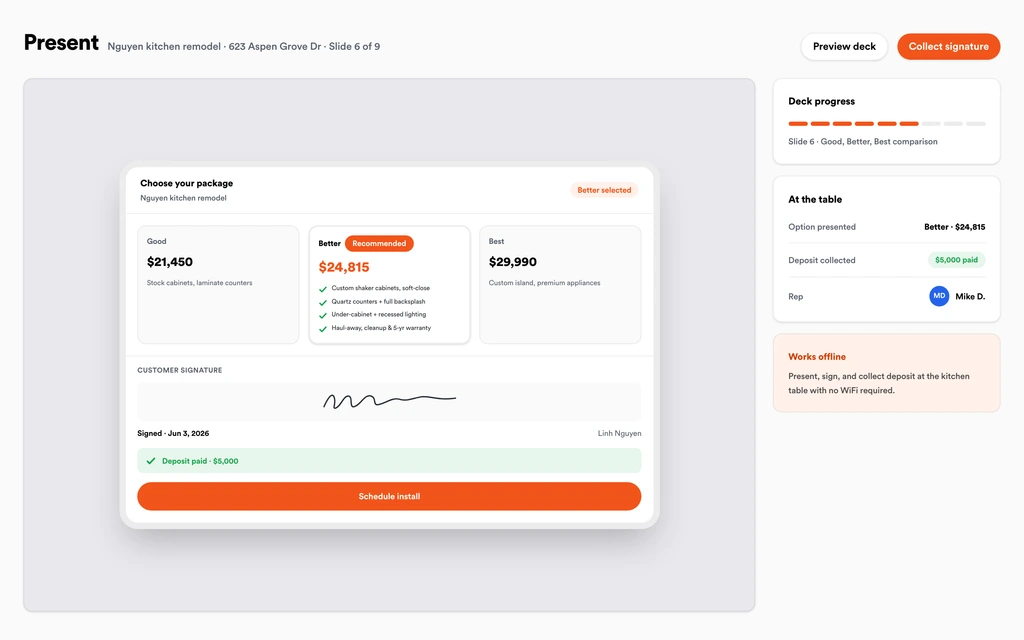
SurveysWalk the family through the shell, the deck, and features like a spa, sun shelf, or water feature in the in-home presentation. Show monthly payment math if they ask, and take the signature and deposit together.
Sales presentationsBuild tiers from saved assemblies for excavation, steel, gunite or fiberglass shell, plumbing, equipment pad, tile, coping, decking, and plaster. Your measurements and quantities drive the math, and each tier shows its margin so the upgraded package still pays.
EstimatesStore the permit, engineering, survey, HOA approval, and contracts on the job. Every phase photo from layout through startup lands on the same file, so inspection sign-offs are in one place and production managers see them with role-based access.
Job tracking and photosSchedule dig, steel, shell, plumbing, electrical, tile and coping, decking, and plaster on the crew board, and drag phases when an inspection or the weather slips. Crews clock in from the site with GPS, and the homeowner gets a text when dates move.
SchedulingThe homeowner follows progress photos and the timeline in the portal without calling. Mid-build requests like added lighting or a larger deck come in as change requests you price and send back, and approved change orders roll onto the next draw.
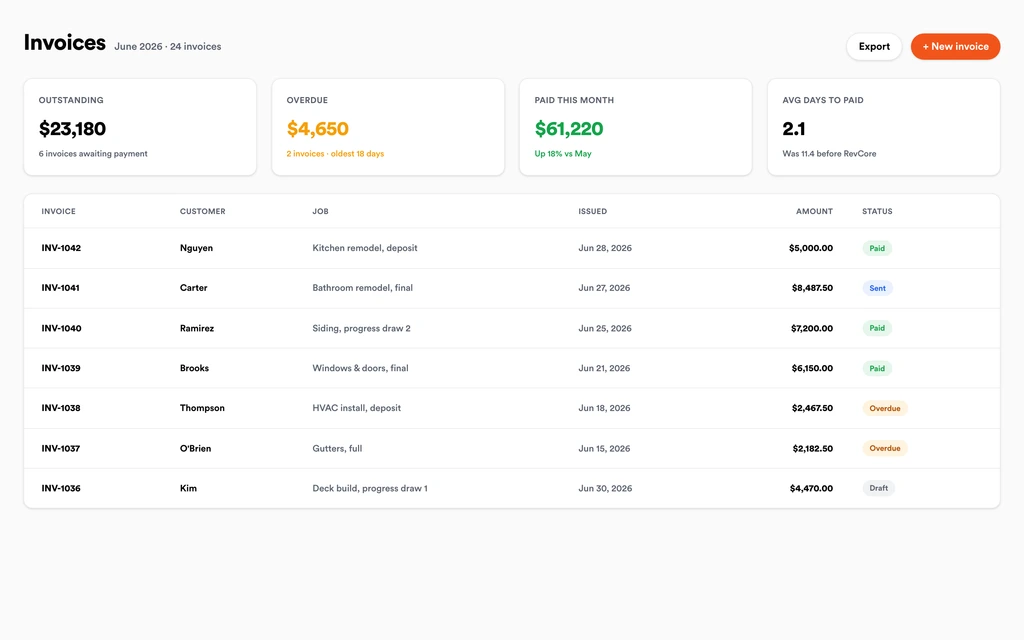
Homeowner portalBill a draw at dig, shell, and plaster, or by percentage complete, with change orders already on the invoice. Margin Protection keeps your full price when the homeowner pays a large draw by card, and payouts land in 1 to 2 business days, or instantly for eligible accounts.
InvoicingSet up for the way pools jobs run.
Itemized proposals
Shell, decking, and feature options clients approve from their phone.
Project pipeline
Track every phase from excavation to startup with clear stages.
Document control
Permits, plans, and progress photos tied to the project.
Milestone billing
Draw by phase or percentage complete with fast payouts.
What to look for in pools software.
Take this list to any demo or trial, ours included. If a tool cannot show you each of these on a real job, keep looking.
Itemized, tiered proposals
Pool bids have dozens of components. Look for saved assemblies and tiers so features and upgrades are priced the same way on every bid.
Phase tracking from dig to startup
A pool build runs through many phases and trades. Each phase should be visible on the project with its own dates and photos.
Draw billing tied to phases
Draws should follow the build: deposit, dig, shell, and plaster, or percentage complete. Check that change orders roll into the next draw.
Document storage for permits and plans
Permits, engineering, HOA approvals, and contracts should live on the project, not in an inbox, so the whole team works from the current set.
A homeowner portal
Pool buyers want updates constantly during a multi-month build. A portal with photos and a timeline cuts down the check-in calls.
Low fees on large payments
Draws on a pool are large. Check the ACH fee cap and whether card fees can be folded into the estimate.
Maintenance plans after the build
A finished pool is a service client. Look for recurring plans with scheduled visits and card on file billing each cycle.
Visit notes for service
Service techs need to log readings and products used on each visit. Check whether custom fields can hold the readings you track.
The whole platform comes standard.
Quoting is the start. Every pools account runs the full job, from the first lead to the final payment, in one login.
- CRM and pipelineEvery lead and job on one board
- Estimates and proposalsGood, Better, Best, signed on the spot
- Scheduling and dispatchCrews on one shared calendar
- CommunicationsTexts, calls, and email in one thread
- Invoicing and paymentsDeposits and finals, paid online
- Service agreementsRecurring work, tracked
- AutomationsFollow-ups that send themselves
- ReportingRevenue and close rate at a glance
Comparing pools software?
Honest side-by-sides with the tools pools crews weigh most. Every plan is one flat price with crew seats included. See pricing.
- Revcore vs BuildertrendConstruction project management with deep sub tools. Revcore adds the in-home sale and the deposit collected at signing.
- Revcore vs JobberSimple scheduling and invoicing for service. Revcore adds phased builds and draw billing.
- Revcore vs Housecall ProHome service scheduling and billing. Revcore adds phase tracking and a homeowner portal.
- Revcore vs ServiceM8Job management for small service crews. Revcore adds proposals, draws, and maintenance plans.
- All comparisons →
“Photos, scheduling, and payments live in one login. My crews update the office without a single end-of-day phone call.”

Composite operator based on early-access usage. Outcomes are illustrative; individual results vary.





Pools questions, answered.
Still deciding if Revcore fits your crew? Talk to our team.
What is the best software for pool builders?
Pool builders need itemized proposals, phase tracking, permit and document storage, homeowner updates, and draw billing. Revcore Pro puts those in one login with an in-home presentation built in. Buildertrend is common for builders managing many subs and long schedules, and pool service companies often use dedicated route tools like Skimmer.
Can Revcore manage pool service visits too?
Yes. Set up maintenance plans billed monthly, schedule the weekly visits on the calendar, and put each tech's stops on the crew board. The card on file is charged each cycle. Billing cadences are monthly, quarterly, semiannual, or annual, not weekly, so most service companies price weekly service as a monthly plan.
Can techs log chemical readings on each visit?
Techs can log readings and products used on the visit with notes and custom fields, and add photos of the water and equipment. Revcore does not include built-in chemical compliance reporting, so if your state requires a specific report, keep that process in place.
How do I bill draws on a pool build?
Set milestones for the deposit, dig, shell, and plaster or startup, or bill by percentage complete. Approved change orders roll onto the invoice, and homeowners pay by card or ACH from a link. Margin Protection marks up each line item to cover card processing, so you keep your full price and the homeowner never sees a fee line, and payment reminders go out on open draws automatically.
Can I track subcontractors on a pool project?
Yes. Schedule each phase on the crew board with notes on which sub is handling steel, plumbing, electrical, or plaster, and keep their documents on the project. Role-based access lets production managers see what they need without billing access, and the timeline shows which phase is holding up the next.
Does Revcore offer pool financing?
Not yet. Built-in homeowner financing is on the roadmap. Today you can show monthly payment math in the in-home presentation and keep using your current pool lender. Margin Protection marks up each line item to cover card processing, so you keep your full price and the homeowner never sees a fee line.
Can homeowners see build progress without calling?
Yes. The homeowner portal shows progress photos, the timeline, and documents without an app or account. Homeowners can also submit change requests, then approve, e-sign, and pay change orders from the portal, so updates and decisions do not depend on catching the project manager by phone.
Does it work on my phone in the field?
Yes. Revcore runs on the web, iOS, and Android, so pools crews can open the job, add photos, take a signature, and collect payment from the site.
How fast can we switch over?
Most crews are live within a week. Paid plans include hands-on onboarding: we import your customers and pricing, set up your proposal templates, and add your team, then check in until it sticks.
What does Revcore Pro cost for pools?
Plans start at $249/mo billed monthly ($207/mo on annual billing, 2 months free) with crew seats included, plus CRM, estimating, scheduling, and invoicing. Every plan includes a 14-day free trial with no credit card required.







