Quote the build, lock the materials, get paid in stages.
Decks sell on the design and the details. Revcore helps you present material options, document the build, and collect across milestones so the project pays as it progresses.
14-day free trial, no credit card required.

What decks & patios contractors need from software
Deck and patio builders need to sell material choices clearly, track permits and footing inspections, and get paid in stages across the build. Revcore Pro handles that in one login, with tiered decking and railing proposals, selections locked on the job, inspection photos stored with the permit, and deposit, framing, and final draws billed from the job.
Where decks & patios jobs get stuck.
The same few things cost decks & patios crews time and money on every job. This is what Revcore takes off your plate.
- 01
Material choices that slow the sale
Show composite, wood, and railing options with clear, tiered pricing.
- 02
Permits and footings to track
Keep permits and inspection photos on the job for clean sign-off.
- 03
Waiting until the end to get paid
Bill deposit, framing, and final so cash keeps flowing.
How a decks & patios job runs in Revcore.
From the first call to the final payment, every step happens on the same job record, so nobody retypes anything and nothing waits on the office.





Decks & Patios job, example
Book the design visit
1/7




Leads from your web forms land on the pipeline with their source tagged. A quick survey asks about deck size, height off grade, and material preference before you schedule the site visit.
CRM and pipelinePhotograph the house band, the grade, and the existing deck if it is coming off. Mark up photos to show the footprint, stairs, and ledger location, and add your measurements, joist spans, and footing count to the job.
Job tracking and photosBuild Good, Better, Best around decking and railing lines from saved assemblies, with framing, footings, and hardware priced the same way every time. The homeowner compares tiers on their phone and signs with the deposit.
EstimatesBoard color, railing style, fascia, and lighting go on the job as custom fields so the order and the crew match what was sold. Changes after signing come through as priced change orders the homeowner approves from the portal before anything is reordered.
Custom fieldsStore the permit, the drawings, and the footing hole photos on the job before concrete goes in. Framing inspection photos go on the same file, so the sign-off paperwork is in one place and the crew sees it on their phones before they frame.
Job tracking and photosBook footings, framing, and decking days on the crew board and drag them when an inspection slips. Crews clock in with GPS, and the homeowner follows progress photos in the portal, so nobody has to call to ask whether the boards went down today.
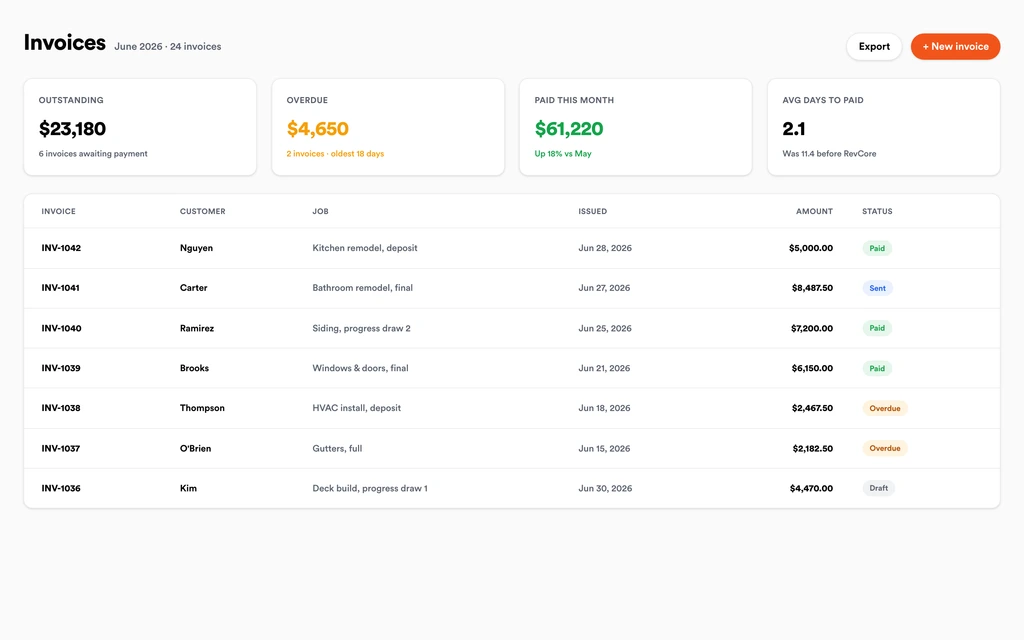
SchedulingDraw the deposit at signing, a framing payment after inspection, and the final after the last board and stair rail. Text-to-pay and ACH links go out from the job, and payouts land in 1 to 2 business days, or instantly for eligible accounts.
InvoicingSet up for the way decks & patios jobs run.
Tiered proposals
Decking, railing, and add-on packages clients approve at home.
Selection tracking
Materials and finishes locked on the job so the order is right.
Photo documentation
Footings through final boards documented for inspections and warranty.
Milestone billing
Deposit, framing, and final draws collected without the chase.
What to look for in decks & patios software.
Take this list to any demo or trial, ours included. If a tool cannot show you each of these on a real job, keep looking.
Material tiers that sell themselves
Pressure treated, composite, and PVC at three price points make the upgrade easy. Look for tiered proposals the homeowner can sign from home.
Assemblies for framing and hardware
Footings, joists, hangers, and fasteners should price with the decking, so every bid carries the structure, not just the boards.
Selections stored on the job
Board color and railing style errors are expensive. Selections should sit on the job where the crew and the order both see them.
Permit and inspection records
Footing and framing inspections gate the build. Keep permits, drawings, and inspection photos on one job file where the crew and office can both find them.
Milestone draws
Deposit, framing, and final should be separate billable milestones, not one big invoice at the end of a three week job.
Change orders from the homeowner
Added lighting, a wider stair, or a pergola come up mid-build. Priced, approved change orders should roll onto the invoice.
Progress photos the homeowner can see
A portal with progress photos cuts the check-in calls, especially when the homeowner is at work during the build. It also leaves a dated record.
The whole platform comes standard.
Quoting is the start. Every decks & patios account runs the full job, from the first lead to the final payment, in one login.
- CRM and pipelineEvery lead and job on one board
- Estimates and proposalsGood, Better, Best, signed on the spot
- Scheduling and dispatchCrews on one shared calendar
- CommunicationsTexts, calls, and email in one thread
- Invoicing and paymentsDeposits and finals, paid online
- Service agreementsRecurring work, tracked
- AutomationsFollow-ups that send themselves
- ReportingRevenue and close rate at a glance
Comparing decks & patios software?
Honest side-by-sides with the tools decks & patios crews weigh most. Every plan is one flat price with crew seats included. See pricing.
- Revcore vs BuildertrendFull construction project management. Revcore is lighter, with the sale and draws in one flow.
- Revcore vs JobberSimple quoting and scheduling. Revcore adds milestone draws and an in-home presentation.
- Revcore vs Contractor ForemanBudget construction management. Revcore centers on the homeowner sale and crew scheduling.
- Revcore vs CompanyCamPhoto documentation only. Revcore keeps inspection photos with permits on the job.
- All comparisons →
“Photos, scheduling, and payments live in one login. My crews update the office without a single end-of-day phone call.”

Composite operator based on early-access usage. Outcomes are illustrative; individual results vary.






Decks & Patios questions, answered.
Still deciding if Revcore fits your crew? Talk to our team.
What is the best software for deck builders?
Deck builders need tiered material proposals, selection tracking, permit and inspection records, and milestone billing. Revcore Pro covers those in one login with crew seats included. Buildertrend is common for design-build firms with subs and long schedules, and Jobber is used by smaller deck and fence crews that want simple quoting and scheduling.
Can Revcore design a deck or draw plans?
No. Revcore does not produce deck designs or permit drawings. Use your design tool of choice, then attach the drawings and renderings to the job and proposal so the homeowner and the crew work from the same plan. The measurements and quantities you enter still drive the estimate.
How do I quote composite versus wood decking?
Set up saved assemblies for each decking and railing line, then build a Good, Better, Best proposal from your measured square footage and linear feet of rail. Each tier shows its margin before the proposal goes out, and the homeowner signs and pays the deposit from their phone.
Can I track deck permits and inspections?
Yes, as records on the job. Store the permit, drawings, footing photos, and inspection results on the job file. Revcore does not file permits with your building department, but it keeps every document where your crew and office can find it.
How should I bill a deck build?
A common structure is a deposit at signing, a payment after the framing inspection passes, and the final at completion. Revcore supports deposits, milestone billing, and percentage-complete billing, with card and ACH payment links sent by text. Payouts land in 1 to 2 business days, or instantly for eligible accounts.
Can homeowners approve add-ons like lighting or a pergola?
Yes. The homeowner submits a change request from the portal, you price it, and they approve and e-sign it. The approved change order rolls onto the invoice automatically. Pricing comes from your saved line items, so a pergola or lighting package is quoted the same way every time.
Can I manage deck repair and staining jobs too?
Yes. Quote smaller repair, board replacement, and staining jobs from saved line items, schedule them on the crew board, and collect on site with a text-to-pay link. Automations can remind past clients when it is time to restain, which keeps repeat work coming in the shoulder seasons.
Does it work on my phone in the field?
Yes. Revcore runs on the web, iOS, and Android, so decks & patios crews can open the job, add photos, take a signature, and collect payment from the site.
How fast can we switch over?
Most crews are live within a week. Paid plans include hands-on onboarding: we import your customers and pricing, set up your proposal templates, and add your team, then check in until it sticks.
What does Revcore Pro cost for decks & patios?
Plans start at $249/mo billed monthly ($207/mo on annual billing, 2 months free) with crew seats included, plus CRM, estimating, scheduling, and invoicing. Every plan includes a 14-day free trial with no credit card required.







