Book the move, run the crew, collect on delivery.
Moving is logistics under pressure. Revcore helps you quote the job, schedule the crew and truck, and collect on delivery so the day runs as smooth as the load.
14-day free trial, no credit card required.

What moving contractors need from software
Moving companies need to quote moves by crew size, hours, and truck, lock in a deposit at booking, schedule crews and trucks around a packed calendar, and collect the balance at delivery. Revcore Pro handles quoting, deposits, crew scheduling, dispatch, condition photos, and final payment in one login. It does not include inventory or cubic foot survey tools built for moving companies.
Where moving jobs get stuck.
The same few things cost moving crews time and money on every job. This is what Revcore takes off your plate.
- 01
Quoting moves accurately
Build estimates by volume, hours, and crew with clear pricing.
- 02
Crew and truck scheduling
Assign movers and trucks and confirm with GPS clock-in.
- 03
Payment on the busy day
Collect a deposit on booking and the balance on delivery.
How a moving job runs in Revcore.
From the first call to the final payment, every step happens on the same job record, so nobody retypes anything and nothing waits on the office.





Moving job, example
Catch the move request
1/7





Web forms land on the pipeline with the move date, origin, and destination. A survey asks about home size, stairs, elevators, and big items, so you can quote without a long first call.
Lead capturePrice from saved line items for crew size and hours, truck, travel time, packing materials, and specialty items like pianos or safes. Offer tiers such as load only, full service, or full service with packing, then send it to the customer's phone.
EstimatesThe customer e-signs and pays the deposit in the same step, and the signed quote becomes the job without retyping. Month-end and summer Saturdays fill fast, so the deposit is what holds the truck.
PaymentsDrag the move onto the crew board, assign the movers, and note the truck on the job. Two-way Google Calendar sync and role-based access keep the office, the foreman, and the crew looking at the same day.
SchedulingThe customer gets an automatic appointment reminder before move day. Movers clock in with GPS at the job site, and the office sees who has clocked in.
Field and dispatchPhotograph furniture, floors, and door frames before loading and after unloading, with markup on existing scratches. Notes and photos stay on the job file, which is your record if a damage claim comes in.
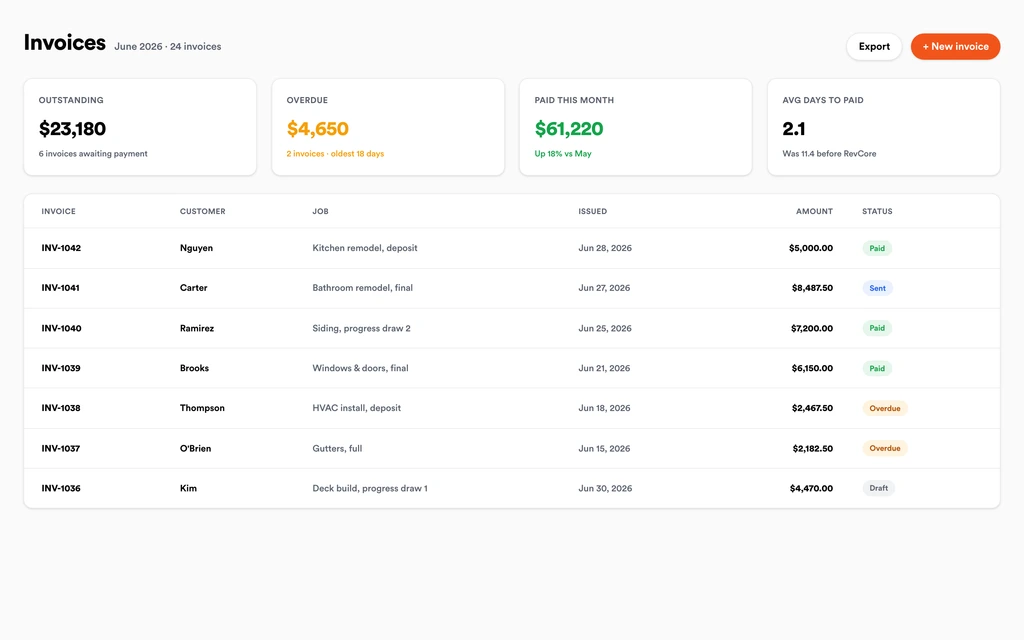
Job tracking and photosInvoice from the job with the deposit applied and any added hours or items on it. Charge the card on file before the crew leaves, or send a text-to-pay link, and payouts land in 1 to 2 business days, or instantly for eligible accounts.
InvoicingSet up for the way moving jobs run.
Detailed estimates
Quote by hours, crew size, and inventory with consistent pricing.
Scheduling and dispatch
Coordinate crews and trucks and keep customers posted.
Job documentation
Inventory and condition photos stored on the job file.
Deposit and final billing
Collect a deposit up front and the balance on delivery.
What to look for in moving software.
Take this list to any demo or trial, ours included. If a tool cannot show you each of these on a real job, keep looking.
Quotes by crew, hours, and truck
Moves price on labor time and equipment. Saved line items for crew size, hourly rates, travel, and materials keep every estimator quoting the same way.
Deposits that hold the date
Peak weekends book up weeks out. A signature and deposit collected in one step keeps the truck reserved and cuts no-shows.
Crew and truck scheduling on one board
You are juggling movers, foremen, and trucks. A drag-and-drop crew board with notes on the job keeps assignments visible to everyone.
Condition photos before and after
Damage claims come down to what the item looked like before the move. Photos with markup on the job file are your evidence.
Hours you can verify
Hourly moves need honest time. GPS clock-in ties crew hours to the job so the final bill and the timesheet agree.
An honest answer on inventory
Know whether the platform builds item inventories and cubic foot estimates. Revcore does not, so heavy long-distance movers often need moving-specific software.
Balance collected on delivery
Final payments should not wait for a mailed check. Text-to-pay and card-on-file charges close the job while the crew is still on site.
The whole platform comes standard.
Quoting is the start. Every moving account runs the full job, from the first lead to the final payment, in one login.
- CRM and pipelineEvery lead and job on one board
- Estimates and proposalsGood, Better, Best, signed on the spot
- Scheduling and dispatchCrews on one shared calendar
- CommunicationsTexts, calls, and email in one thread
- Invoicing and paymentsDeposits and finals, paid online
- Service agreementsRecurring work, tracked
- AutomationsFollow-ups that send themselves
- ReportingRevenue and close rate at a glance
Comparing moving software?
Honest side-by-sides with the tools moving crews weigh most. Every plan is one flat price with crew seats included. See pricing.
- Revcore vs VonigoUsed by moving and franchise brands for booking. Revcore adds tiered quotes and fast payouts.
- Revcore vs WorkizBuilt for on-demand dispatch. Revcore pairs scheduling with a full pipeline and deposits at signing.
- Revcore vs JobberGeneral field service tool. Revcore adds deposits at signing and crew seats included in a flat plan.
- Revcore vs SquareSimple payments for small movers. Revcore adds quotes, crew scheduling, and condition photos.
- All comparisons →
“Recurring visits bill themselves now. We stopped leaving money on the table between jobs, and collections stopped being a chore.”

Composite operator based on early-access usage. Outcomes are illustrative; individual results vary.






Moving questions, answered.
Still deciding if Revcore fits your crew? Talk to our team.
What is the best software for moving companies?
It depends on the moves you run. Local movers need quotes by crew and hours, deposits, crew scheduling, condition photos, and payment on delivery, and Revcore Pro covers those in one login. Moving-specific platforms like SmartMoving and Supermove add inventory and move surveys. Vonigo and Workiz are also used by moving companies for booking and dispatch.
Does Revcore build moving inventories or cubic foot estimates?
No. Revcore does not have item inventory lists, cubic foot calculators, or virtual survey tools. You can note large items in the job notes, photograph rooms, and use custom fields for details like piano or safe, but long-distance movers that price by weight or volume usually need moving-specific software.
Can I quote hourly moves and flat-rate moves?
Yes. Build hourly quotes from saved line items for crew size, hourly rate, truck, and travel time, or quote a flat price for the whole move. Tiers let the customer choose load only, full service, or packing included, and they sign and pay the deposit from their phone.
How do I track crew hours on hourly moves?
Movers clock in and out from the job with GPS, with location consent, and the hours tie to that move. Use those hours to confirm the time on the final invoice. Revcore tracks time for each job but does not process payroll.
How do I handle damage claims?
Take condition photos at pickup and delivery with markup on existing damage, and keep notes and signed documents on the job file. When a customer reports damage, the photo record and timeline are in one place. Revcore stores the record but does not administer valuation coverage or claims.
Can I collect a deposit when the customer books?
Yes. The customer signs the estimate and pays the deposit in the same step by card or ACH. The deposit carries onto the final invoice, and the balance is collected at delivery with the card on file or a text-to-pay link.
Does Revcore work for packing and junk add-ons on a move?
Yes. Add packing labor, boxes and materials, or haul-away of unwanted items as saved line items on the quote. If the customer adds services on move day, have them approve the change on their phone so it lands on the final invoice.
Does it work on my phone in the field?
Yes. Revcore runs on the web, iOS, and Android, so moving crews can open the job, add photos, take a signature, and collect payment from the site.
How fast can we switch over?
Most crews are live within a week. Paid plans include hands-on onboarding: we import your customers and pricing, set up your proposal templates, and add your team, then check in until it sticks.
What does Revcore Pro cost for moving?
Plans start at $249/mo billed monthly ($207/mo on annual billing, 2 months free) with crew seats included, plus CRM, estimating, scheduling, and invoicing. Every plan includes a 14-day free trial with no credit card required.







