Price the linear feet, book the install, collect fast.
Fence work is volume work with real material costs. Revcore lets you quote by the foot, lock the materials, and collect on completion so high-volume jobs stay profitable.
14-day free trial, no credit card required.

What fencing contractors need from software
Fence contractors run volume: lots of quotes priced by the linear foot, gates and posts that have to be counted right, and installs that should be grouped by area and paid on completion. Revcore Pro handles that with saved per-foot line items, material options for wood, vinyl, and aluminum, a crew board and job map, and a text-to-pay link when the last gate is hung.
Where fencing jobs get stuck.
The same few things cost fencing crews time and money on every job. This is what Revcore takes off your plate.
- 01
Measuring property lines by hand
Capture the run and gates on site and turn it into a priced quote fast.
- 02
Material and style choices
Show wood, vinyl, and aluminum options with clear linear-foot pricing.
- 03
Small jobs, slow payments
Collect on completion so volume work does not become slow collections.
How a fencing job runs in Revcore.
From the first call to the final payment, every step happens on the same job record, so nobody retypes anything and nothing waits on the office.





Fencing job, example
Answer every fence inquiry
1/7





Fence leads come in fast in spring. Web forms land on the pipeline, and two-way texting lets you reply in seconds so the homeowner does not call the next company on the list.
CRM and pipelinePace off the run on site, then log linear feet, gate count, corners, and grade changes on the job. Mark up photos to show where the line starts, where gates go, and anything near the property line to confirm.
Job tracking and photosSaved line items price posts, rails, pickets or panels, gates, and hardware per foot, so the quote is consistent across estimators. Show wood privacy, vinyl, and aluminum as Good, Better, Best with a margin check on each.
EstimatesThe homeowner signs from their phone and pays the deposit in the same step, and the approved estimate becomes a job without retyping. Style, height, and color selections stay on the job so the right panels, posts, and caps get picked up for the install.
PaymentsThe job map shows where every install sits, so you can put two installs in the same subdivision on one crew's day from the crew board. The homeowner gets an automatic appointment reminder, and GPS clock-in shows which crews have clocked in on site.
Field and dispatchPhotograph the posts, gates, and the finished run before the crew leaves. Photos and the warranty terms stay on the job and in the homeowner portal in case a gate sags next year, and a review request can go out automatically once the job closes.
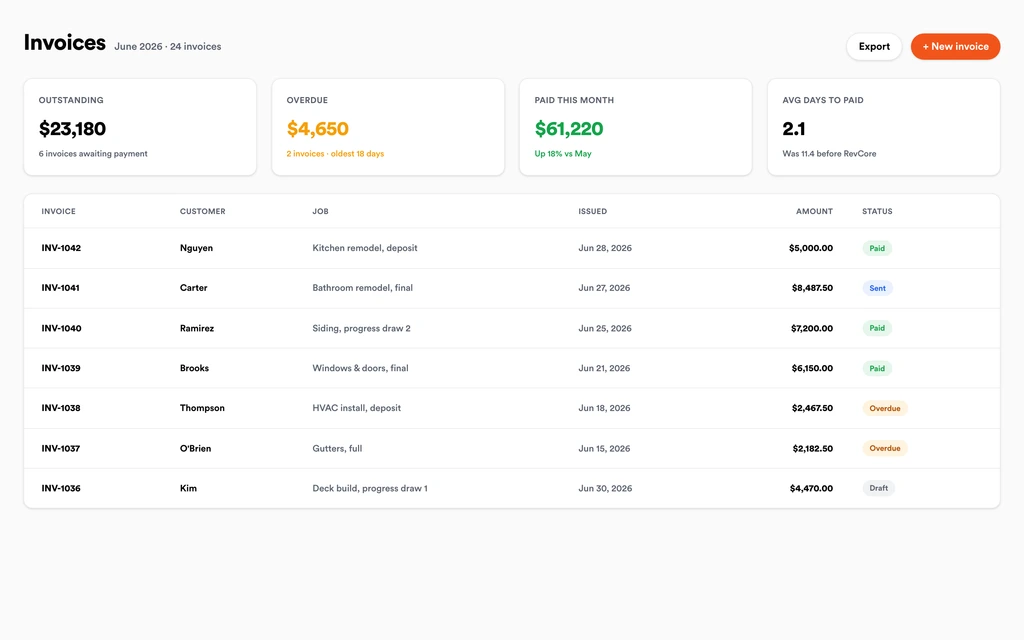
Job tracking and photosInvoice from the job with any added gates or extra footage already on it. Charge the card on file or send a text-to-pay link, and payouts land in 1 to 2 business days, or instantly for eligible accounts, so volume work does not turn into a stack of open invoices.
InvoicingSet up for the way fencing jobs run.
Linear-foot estimates
Quote by the foot with gates and posts priced consistently.
Material options
Wood, vinyl, and metal packages presented as simple upgrades.
Scheduling with a job map
See job sites on a map and group nearby installs on the same day so crews drive less and build more.
Payments in the field
Bill from the field and get paid before the next install.
What to look for in fencing software.
Take this list to any demo or trial, ours included. If a tool cannot show you each of these on a real job, keep looking.
Linear foot pricing
Fence quotes live and die on the per-foot number. Look for saved line items that price posts, panels, and hardware from your footage.
Gates and corners priced right
Gates, corner posts, and end posts are where quotes go wrong. They should be separate line items that never get skipped.
Material options side by side
Wood, vinyl, chain link, and aluminum at different price points make the upgrade easy. The homeowner should compare them on one proposal.
Fast response to inquiries
Fence buyers call several companies. A fast reply by text and quick quote delivery keep you in the running.
Scheduling with a job map
Installs cluster in neighborhoods. Seeing job sites on a map lets you group nearby installs, cut drive time between jobs, and fit more installs in a week.
Payment on completion in the field
Volume work cannot wait on mailed checks. Text-to-pay for card or ACH should be ready the moment the gate is hung.
Lead source tracking
Fence companies spend on yard signs, ads, and referrals. Attribution should show which sources turned into signed installs, not just calls.
The whole platform comes standard.
Quoting is the start. Every fencing account runs the full job, from the first lead to the final payment, in one login.
- CRM and pipelineEvery lead and job on one board
- Estimates and proposalsGood, Better, Best, signed on the spot
- Scheduling and dispatchCrews on one shared calendar
- CommunicationsTexts, calls, and email in one thread
- Invoicing and paymentsDeposits and finals, paid online
- Service agreementsRecurring work, tracked
- AutomationsFollow-ups that send themselves
- ReportingRevenue and close rate at a glance
Fencing software, by category
Looking for one piece? Each page shows how that part works for fencing crews.
Comparing fencing software?
Honest side-by-sides with the tools fencing crews weigh most. Every plan is one flat price with crew seats included. See pricing.
- Revcore vs JobberCommon with fence crews for quoting and scheduling. Revcore adds tiered proposals with margin checks.
- Revcore vs Housecall ProBroad home service tool. Revcore includes crew seats and fast payouts in a flat plan.
- Revcore vs WorkizField service with phone features. Revcore adds tiered per-foot proposals and attribution.
- Revcore vs SquarePayments and simple invoices. Revcore ties payment to the quote, job, and crew.
- All comparisons →
“Photos, scheduling, and payments live in one login. My crews update the office without a single end-of-day phone call.”

Composite operator based on early-access usage. Outcomes are illustrative; individual results vary.






Fencing questions, answered.
Still deciding if Revcore fits your crew? Talk to our team.
What is the best software for fence contractors?
Fence companies need fast per-foot quoting, material options, grouped install scheduling, and payment on completion. Revcore Pro covers that in one login with crew seats included. Jobber and Housecall Pro are common choices for fence crews, and some companies use a dedicated fence estimating tool alongside their field software for diagrams.
Can Revcore measure a fence line from satellite images?
No. Revcore does not measure from aerial or satellite imagery. Walk the line or use your preferred measuring tool, then enter linear feet, gates, and corners, and your saved line items price the job. Marked-up photos on the job show the crew exactly where the line runs.
How do I price gates, corners, and posts in a fence quote?
Set each up as its own saved line item: single gate, double drive gate, corner post, end post, and hardware. Add them to the footage-based assembly so every quote counts them, and the margin check shows whether the job holds up.
Can I offer wood, vinyl, and aluminum options on one quote?
Yes. Build a Good, Better, Best proposal with each material as a tier, priced from the same footage. The homeowner compares them on their phone, picks one, signs, and pays the deposit in one step. The approved tier becomes a job without retyping.
Can I schedule fence installs by neighborhood?
Yes. The job map shows every install by status, so you can see which ones sit in the same neighborhood and drag them onto the same crew and day on the crew board. Homeowners get automatic appointment reminders, and crews clock in and out with GPS at the job site.
Does Revcore handle commercial fence jobs?
Yes. Commercial jobs can use progress billing or milestones instead of a single final, and clients can pay by card or ACH from a link. Documents, specs, and contracts stay on the job file, and payment reminders go out on open invoices automatically.
Can I track which ads bring in fence jobs?
Yes. Lead source attribution shows which sources became signed jobs, so you can compare yard signs, search ads, and referrals by revenue instead of by call volume. Web forms and surveys carry their source onto the lead, so the numbers do not depend on someone asking how they heard about you.
Does it work on my phone in the field?
Yes. Revcore runs on the web, iOS, and Android, so fencing crews can open the job, add photos, take a signature, and collect payment from the site.
How fast can we switch over?
Most crews are live within a week. Paid plans include hands-on onboarding: we import your customers and pricing, set up your proposal templates, and add your team, then check in until it sticks.
What does Revcore Pro cost for fencing?
Plans start at $249/mo billed monthly ($207/mo on annual billing, 2 months free) with crew seats included, plus CRM, estimating, scheduling, and invoicing. Every plan includes a 14-day free trial with no credit card required.







