Quote every window, order it right, install it clean.
Window treatments come down to exact openings and clear options. Revcore keeps measurements, product specs, and install dates connected so the order is right the first time.
14-day free trial, no credit card required.

What blinds & shutters contractors need from software
Window treatment dealers need software that quotes window by window, keeps product, color, and mount type tied to each opening, and gets the order right before anything is cut. Revcore Pro gives you per-window line items, Good, Better, Best options in the home, a deposit at approval, and install scheduling with customer updates. Your consultant measures each opening and enters the sizes.
Where blinds & shutters jobs get stuck.
The same few things cost blinds & shutters crews time and money on every job. This is what Revcore takes off your plate.
- 01
Window-by-window measuring
Record each opening on site and reuse the sizes in the quote and order.
- 02
Too many product options
Show blinds, shutters, and shades with clear pricing per window.
- 03
Orders that come back wrong
Tie product and size to the job so what you quote is what you order.
How a blinds & shutters job runs in Revcore.
From the first call to the final payment, every step happens on the same job record, so nobody retypes anything and nothing waits on the office.





Blinds & Shutters job, example
Book the in-home consultation
1/7




Leads from your website forms land on the pipeline. A short survey asks how many windows, which rooms, and whether the customer is thinking shutters, shades, or blinds, so the consultant brings the right samples.
SurveysEnter width, height, and inside or outside mount for every window on the job, labeled by room. Photograph tricky openings, like arched tops, bay windows, and sliders, so the installer sees what the consultant saw.
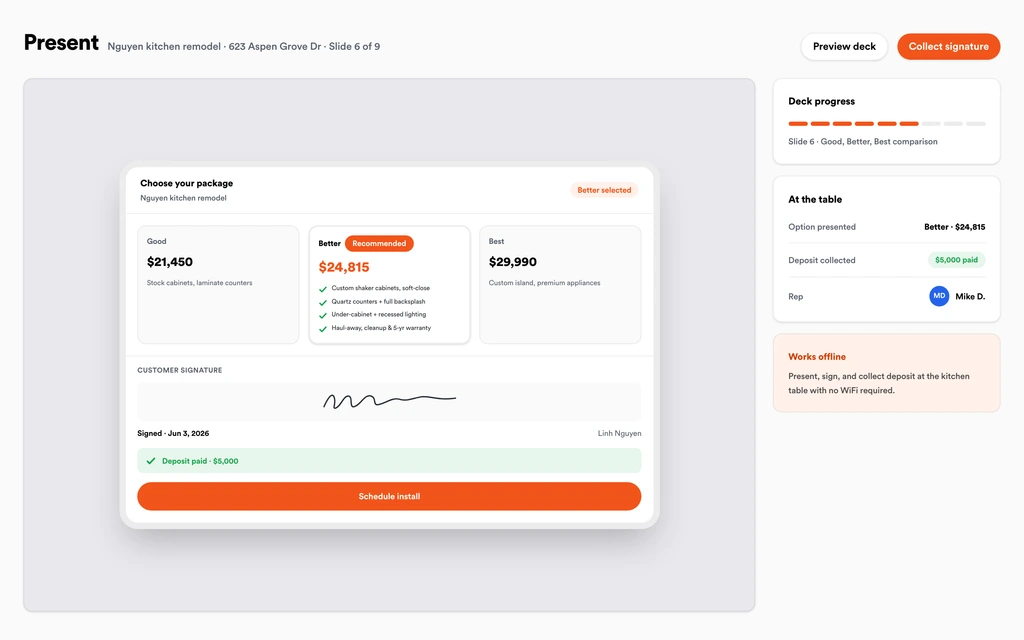
Job tracking and photosBuild the quote from saved line items per opening, then present Good, Better, Best, such as faux wood blinds, cellular shades, and plantation shutters. The customer compares the whole house at each level in the in-home presentation.
Sales presentationsThe customer e-signs and pays the deposit in the same step, by card or ACH. The approved estimate becomes a job with every window, product, color, and mount carried over, so nothing gets retyped for the order.
EstimatesLouver size, slat color, lift type, and mount per window are stored in custom fields on the job. The office places the order from what the customer approved, which is what keeps remakes from coming back.
Custom fieldsDrop the install on the crew board once product ships, and send a confirmation by text. Before install day, an automatic appointment reminder goes out, and the installer has the room-by-room list on the job.
SchedulingInvoice the balance from the job with the deposit credited, and send a text-to-pay link after you walk the customer through each room. An automated review request follows once the invoice is paid, while the new shutters are still the talk of the house.
AutomationsSet up for the way blinds & shutters jobs run.
Per-window estimates
Quote each opening with product and size built in.
Spec tracking
Product, color, and mount stored on the job for clean orders.
Scheduling and reminders
Coordinate measure, delivery, and install with client updates.
Deposit billing
Collect a deposit on approval and the balance at install.
What to look for in blinds & shutters software.
Take this list to any demo or trial, ours included. If a tool cannot show you each of these on a real job, keep looking.
Per-window line items
A whole-house quote can cover twenty or more openings. Your software should price each window on its own line so the customer can add or drop rooms.
Room labels and mount type on every opening
Inside versus outside mount is where most remakes start. Each window should carry its room, size, and mount through to the order.
Side-by-side product tiers
Customers choose between blinds, shades, and shutters by price. Tiered options with a margin check let the consultant present all three confidently.
Specs that match the order
Color, louver size, and lift type should be saved on the job. What the customer approved should be exactly what the office orders.
Deposit at signing
Custom treatments are made to size and cannot be returned. Collecting the deposit with the signature protects you before the order goes in.
Install scheduling with customer updates
Lead times change by product. Moving the install should take a drag, and the customer should hear about it by text.
An honest answer on measuring
Know whether the software measures windows. Revcore stores the sizes your consultant enters and does not measure openings or generate cut lists.
Follow-up for the rest of the house
Many customers start with one room. Automated follow-ups and a full customer history make it easy to quote the next rooms later.
The whole platform comes standard.
Quoting is the start. Every blinds & shutters account runs the full job, from the first lead to the final payment, in one login.
- CRM and pipelineEvery lead and job on one board
- Estimates and proposalsGood, Better, Best, signed on the spot
- Scheduling and dispatchCrews on one shared calendar
- CommunicationsTexts, calls, and email in one thread
- Invoicing and paymentsDeposits and finals, paid online
- Service agreementsRecurring work, tracked
- AutomationsFollow-ups that send themselves
- ReportingRevenue and close rate at a glance
Comparing blinds & shutters software?
Honest side-by-sides with the tools blinds & shutters crews weigh most. Every plan is one flat price with crew seats included. See pricing.
- Revcore vs IngagePresentation software for in-home consults. Revcore adds per-window jobs, scheduling, and payments.
- Revcore vs LeapIn-home sales tool. Revcore keeps the quote, install, and balance on one job.
- Revcore vs Improveit 360Remodeler CRM for in-home sales. Revcore adds dispatch, texting, and a homeowner portal.
- Revcore vs JobberGeneral field service tool. Revcore adds tiered in-home presentations and spec fields.
- All comparisons →
“One system from the first call to the final payment. We retired four separate subscriptions the month we switched.”

Composite operator based on early-access usage. Outcomes are illustrative; individual results vary.






Blinds & Shutters questions, answered.
Still deciding if Revcore fits your crew? Talk to our team.
What is the best software for blinds and shutters companies?
Window treatment dealers often weigh an in-home sales tool like Ingage or Leap, a remodeler CRM like improveit360, or a general field service tool like Jobber. Revcore Pro fits dealers who want per-window quotes, the in-home presentation, a deposit at signing, and install scheduling on one job, so the consultant's measurements carry straight into the order spec.
Can I quote each window separately?
Yes. Add each opening as its own line item with room, size, product, and mount type. The customer sees the price per window and the total, can drop a room before signing, and the approved lines carry onto the job for ordering and install.
Does Revcore measure windows or create cut lists?
No. Revcore has no measuring tools and does not generate cut sheets. Your consultant measures each opening and enters width, height, and mount type on the job. Those sizes stay attached to the quote so the office orders from the same numbers.
Can I show blinds, shades, and shutters as different price levels?
Yes. Build Good, Better, Best tiers, such as faux wood blinds, cellular shades, and plantation shutters, across the same set of windows. Each tier shows a margin check, and the customer can sign and pay the deposit on the one they choose during the consultation.
How do I avoid ordering the wrong color or mount?
Store color, louver size, lift type, and mount per window in custom fields on the job, and have the customer approve the estimate with those specs listed. The office orders from the approved job instead of a notepad. Revcore does not send orders to manufacturers directly.
Can I handle builder and designer accounts?
Yes. Keep the builder or interior designer as the contact, track each address or lot as its own job, and tag the lead source so you can see which builders and designers send the most signed work. Progress billing works for larger multi-home orders.
How do I follow up on rooms the customer did not buy?
Leave the unsold rooms on the customer record and set an automated follow-up for a later date. When they are ready for the bedrooms after doing the living room, the measurements, photos, and past quote are already on their timeline, so the second visit is shorter than the first.
Does it work on my phone in the field?
Yes. Revcore runs on the web, iOS, and Android, so blinds & shutters crews can open the job, add photos, take a signature, and collect payment from the site.
How fast can we switch over?
Most crews are live within a week. Paid plans include hands-on onboarding: we import your customers and pricing, set up your proposal templates, and add your team, then check in until it sticks.
What does Revcore Pro cost for blinds & shutters?
Plans start at $249/mo billed monthly ($207/mo on annual billing, 2 months free) with crew seats included, plus CRM, estimating, scheduling, and invoicing. Every plan includes a 14-day free trial with no credit card required.







