1Who sends these messages
Sender: Revcore.
Recipients: business owners and team members who have a Revcore account and chose to receive account texts.
Website: www.revcorepro.com
Support: email support@revcorepro.com or text (480) 907-0300.
2How someone opts in
1. A contractor creates a Revcore account at app.revcorepro.com.
2. On the signup page they agree to the Terms of Service and Privacy Policy. The page reads "By continuing you agree to Revcore Pro's Terms and Privacy Policy." This covers the Terms only, not text messages.
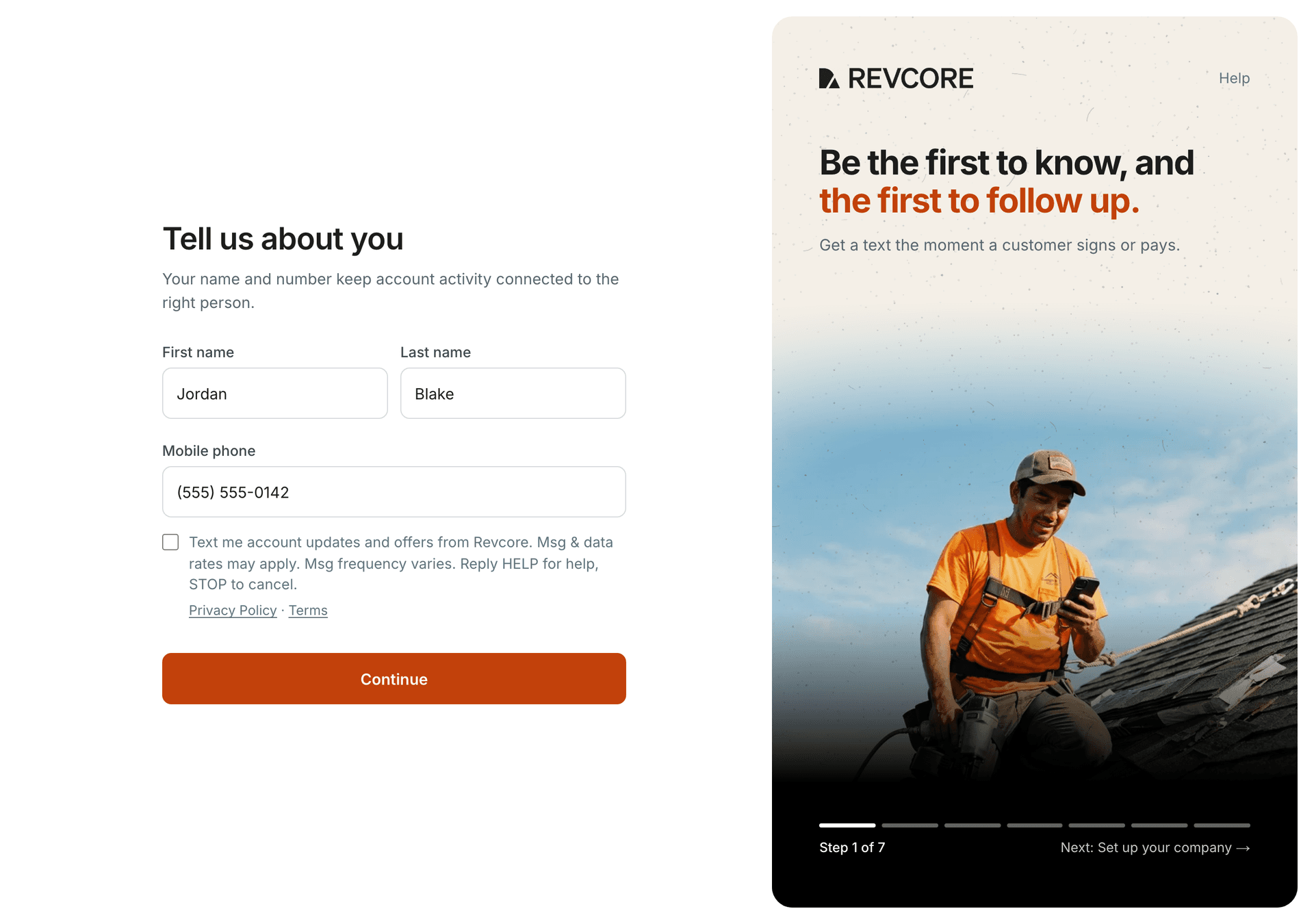
3. On the "Tell us about you" setup screen they enter their mobile number. Directly under it is one optional checkbox that starts unchecked: "Text me account updates and offers from Revcore. Msg & data rates may apply. Msg frequency varies. Reply HELP for help, STOP to cancel." Links to the Privacy Policy and Terms sit directly under the checkbox.
4. Revcore only texts people who checked that box. Setup works the same whether or not it is checked, and people who don't opt in get their alerts by email instead.
5. Revcore records each opt-in with the phone number, the exact wording shown, and the date and time.
6. Right after opting in, the contractor gets one confirmation text that names Revcore, says what they will receive, and explains HELP and STOP (the first sample below).
Contractors can turn account texts off at any time in Settings, under Notifications, or by replying STOP.
3What you'll receive
Account alerts about your own Revcore account, such as new leads, signed estimates, deposits and payments received, failed payments, payouts, change orders, and replies from Revcore Support.
Occasional tips, offers and reminders about your plan and trial.
Message frequency varies with your account activity. Message and data rates may apply.
4Sample messages
Every Revcore text starts with "Revcore:" so you always know who sent it.
"Revcore: You're signed up for account updates and offers. Msg frequency varies. Msg & data rates may apply. Reply HELP for help, STOP to cancel."
"Revcore: Jordan Blake signed estimate Q-1042 ($18,400). Review: https://app.revcorepro.com/estimates/example"
"Revcore: $4,200 received from Jordan Blake Q-1042. View payment: https://app.revcorepro.com/money/invoices/example"
"Revcore: Your $4,200 payout was sent to your bank. View payout: https://app.revcorepro.com/money/payouts"
"Revcore: Payment from Jordan Blake Q-1042 failed. Review: https://app.revcorepro.com/money/invoices/example"
"Revcore: Your verification code is 482913. It expires in 10 minutes. Don't share it with anyone."
"Revcore: We received your message. Our team will reply shortly."
"Revcore: Hi Jordan, your trial ends in 3 days. Your work stays safe and read-only if you don't choose a plan. Compare plans: https://app.revcorepro.com/billing Reply STOP to opt out."
5Help and opting out
Reply STOP (or STOPALL, UNSUBSCRIBE, CANCEL, END or QUIT) to stop. You'll get one confirmation and no more texts.
Reply START to resubscribe.
Reply HELP for help, or email support@revcorepro.com or text (480) 907-0300.
Opting out of texts never affects your account. Your alerts continue by email.
6Privacy
Revcore uses your mobile number only to send the account messages described on this page and to answer your support requests.
No mobile information will be shared with third parties or affiliates for marketing or promotional purposes. Text messaging originator opt-in data and consent will not be shared with any third parties.
Messages are delivered through our messaging provider, which is bound to protect them. Read our Privacy Policy at www.revcorepro.com/privacy and our Terms of Service at www.revcorepro.com/terms.
7Contact
Revcore. Questions about these messages: email support@revcorepro.com or text (480) 907-0300.







